 CloudConsole
The config profile (name) could not be found
The CLI was told to use a named profile, through --profile or the AWS_PROFILE variable, and no section with that name exists in the config or credentials files it read. Most often AWS_PROFILE still points to a profile you renamed or deleted, or the section header is written the wrong way for its file: [profile prod] in ~/.aws/config, but plain [prod] in ~/.aws/credentials.
What the CLI is looking for
$ aws sso login
The config profile (prod) could not be found
The name in brackets is the profile the CLI tried to load. It searches two files, and their header syntax differs:
| File | Named profile header | Default profile |
|---|---|---|
~/.aws/config | [profile prod] | [default] |
~/.aws/credentials | [prod] | [default] |
A section named [prod] in config, or [profile prod] in credentials, is not recognised as profile prod. Names are also case-sensitive: Prod and prod are different profiles.
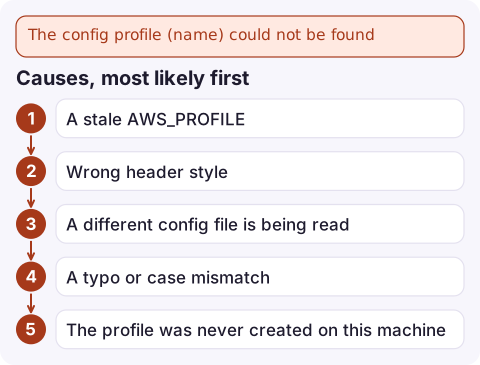
Causes, most likely first
- A stale
AWS_PROFILE. It's set in a shell profile, a.envrcor a CI variable and names a profile that no longer exists. Because it applies to every command, evenaws configure listfails, which makes it look like the CLI is broken. - Wrong header style, as in the table above. Common after hand-copying a snippet meant for the other file.
- A different config file is being read:
AWS_CONFIG_FILEorAWS_SHARED_CREDENTIALS_FILEpoints elsewhere, or you're running as another user (sudo, a CI agent, a container) with its own home directory. - A typo or case mismatch between the command and the file.
- The profile was never created on this machine. SSO profiles made with
aws configure ssoon your laptop don't exist on a build server or a teammate's machine.
Fix it
- See what the CLI thinks is selected and what exists:
echo "AWS_PROFILE=$AWS_PROFILE AWS_CONFIG_FILE=$AWS_CONFIG_FILE" unset AWS_PROFILE aws configure list-profiles - If the profile isn't listed, look at the raw headers:
Correct the header style, or create the profile properly:grep -n '^\[' ~/.aws/config ~/.aws/credentialsaws configure sso --profile prod # IAM Identity Center aws configure --profile prod # access keys - Run the command again with the profile named explicitly:
aws sso login --profile prod aws sts get-caller-identity --profile prod - Remove the stale
export AWS_PROFILE=…from~/.bashrc,~/.zshrcor your CI settings if that was the cause.
Tools beyond the CLI
SDKs and tools such as Terraform read the same files and the same variable, so a bad AWS_PROFILE breaks them all; the Python SDK reports it as ProfileNotFound. In Docker, mount the whole ~/.aws directory to the container user's home (often /root/.aws) and pass -e AWS_PROFILE=prod. In VS Code dev containers and similar setups, check which user the terminal runs as before assuming the mount is correct.
Questions
Why does aws sso login say the config profile could not be found?
aws sso login uses AWS_PROFILE or the default profile when you don't pass --profile. If AWS_PROFILE names a profile that doesn't exist, or the SSO profile header isn't [profile name], it fails with this error.
How do I list my AWS CLI profiles?
Run aws configure list-profiles. It prints every profile found in both the config and credentials files.
Should I put profiles in config or credentials?
Settings such as region, SSO and role_arn belong in ~/.aws/config under [profile name]. Long-term access keys go in ~/.aws/credentials under [name]. Either file can define a profile, but the header styles differ.

A profile mix-up usually just costs you a few minutes, but during an incident those minutes count. CloudConsole, a phone app for AWS, is built to keep alarms and logs readable on your phone while you get your terminal back in order.
Did it start after a deploy? What changed? on the app’s alarm screen lists the deploys and configuration changes from the hour before the alarm fired.
About the app → · Download on the App Store