 CloudConsole
aws configure sso
aws configure sso runs a wizard that signs you in to IAM Identity Center, lets you pick an account and role, and writes a named profile plus an sso-session section to ~/.aws/config. Afterwards you use the profile with --profile and refresh it with aws sso login; no long-term access keys are stored.
What the command does
It asks for your SSO start URL and the Region where IAM Identity Center is set up, opens a browser to authorise the CLI, lists the accounts and roles (permission sets) you can use, and saves the choice. You need AWS CLI version 2; version 1 does not have this command.
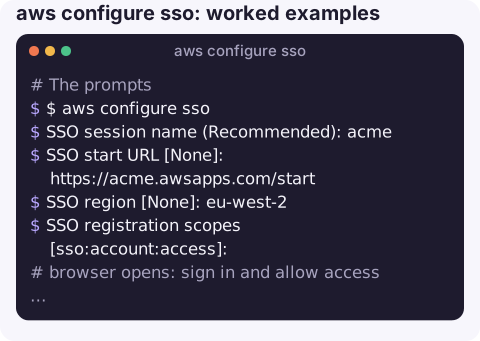
The prompts
$ aws configure sso
SSO session name (Recommended): acme
SSO start URL [None]: https://acme.awsapps.com/start
SSO region [None]: eu-west-2
SSO registration scopes [sso:account:access]:
# browser opens: sign in and allow access
There are 3 AWS accounts available to you.
> prod (123456789012)
There are 2 roles available to you.
> ReadOnly
Default client Region [eu-west-2]:
CLI default output format (json if not specified) [None]: json
Profile name [ReadOnly-123456789012]: prod-readonly
"SSO region" is the Region where Identity Center lives, which can differ from the Region you deploy to. "CLI default output format" accepts json, text, table, yaml or yaml-stream; anything else later causes an unknown output type error.
What it writes
[profile prod-readonly]
sso_session = acme
sso_account_id = 123456789012
sso_role_name = ReadOnly
region = eu-west-2
output = json

[sso-session acme]
sso_start_url = https://acme.awsapps.com/start
sso_region = eu-west-2
sso_registration_scopes = sso:account:access
Run the wizard again for each account and role you need, reusing the same session name. All profiles that share an sso-session are refreshed by one login.
Worked examples
Name the profile up front:
aws configure sso --profile prod-adminUse it:
aws sts get-caller-identity --profile prod-readonly
export AWS_PROFILE=prod-readonly
Add another role by hand, without the wizard, by copying a profile block and changing the account ID and role name. Then:
aws sso login --sso-session acmeWhen it does not work
| Symptom | Fix |
|---|---|
Invalid choice: configure sso | You are on CLI v1. Install version 2. |
| Browser does not open (SSH, container) | Use aws sso login --no-browser or --use-device-code after configuring; see SSO login without a browser. |
InvalidRequestException / client registration errors | Wrong SSO Region: it must be the Identity Center Region, not your workload Region. |
| No accounts listed | Your user has no permission set assignments; an administrator must assign one. |
| Profile works, then token expired | Run aws sso login again; session length is set in Identity Center. |
Gotchas
- Okta, Entra ID and other IdPs: when Identity Center uses an external identity provider, the start URL is still the AWS access portal URL (
https://…awsapps.com/start). The browser step redirects to your IdP for sign-in. - The legacy format (with
sso_start_urldirectly in the profile and nosso-session) still works but cannot refresh tokens automatically; prefer the session form. - Tools other than the CLI need an SDK recent enough to read
sso-sessionprofiles; older ones can use export-credentials as a bridge.
Questions
How do I set the default output format with aws configure sso?
Answer the "CLI default output format" prompt with json, text, table, yaml or yaml-stream, or later run aws configure set output json --profile <name>.
How do I choose the profile name in aws configure sso?
Type it at the final "Profile name" prompt, or start the wizard with aws configure sso --profile <name>.
Can I use aws configure sso with Okta?
Yes, if Okta is connected to IAM Identity Center as the identity source. Use the AWS access portal start URL; the sign-in page will hand off to Okta.
Signing in with SSO on a laptop is routine; doing it on a phone during an incident is not. CloudConsole is built to show AWS alarms, logs and resources on a phone with production guardrails.
About the app → · Download on the App Store