 CloudConsole
ValidationException: Attribute name is a reserved keyword
DynamoDB expressions can't use certain words, such as status, name, data, date, timestamp, user, count, value and ttl, directly as attribute names. Put a placeholder starting with # in the expression (#s) and map it to the real name in ExpressionAttributeNames. The data doesn't change; only how you refer to the attribute in UpdateExpression, ConditionExpression, KeyConditionExpression, FilterExpression or ProjectionExpression.
What it looks like
An error occurred (ValidationException) when calling the UpdateItem operation:
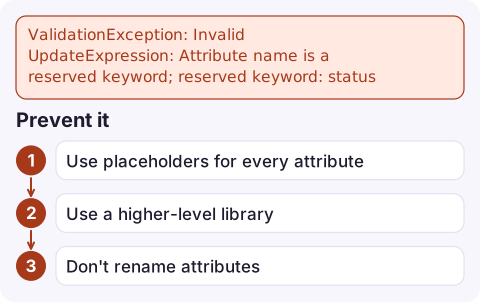
Invalid UpdateExpression: Attribute name is a reserved keyword; reserved keyword: status
The start of the message names the expression type (Invalid UpdateExpression, Invalid FilterExpression, Invalid KeyConditionExpression, Invalid ProjectionExpression) and the end names the word. DynamoDB has several hundred reserved words, and many are natural attribute names, so this is one of the first errors people meet with the expression syntax.
The words are reserved only inside expressions. Items can hold an attribute called status without any problem, and PutItem with a plain item map never hits this error. It appears the moment you update, filter on or project that attribute, which is why it often shows up in a new code path long after the table was designed. Older code using the legacy AttributeUpdates or ScanFilter parameters doesn't hit it either, so migrating to expressions can surface it too.
Fix it with ExpressionAttributeNames
AWS CLI:
aws dynamodb update-item --table-name orders \
  --key '{"pk": {"S": "ORDER#1001"}}' \
  --update-expression 'SET #s = :s' \
  --expression-attribute-names '{"#s": "status"}' \
--expression-attribute-values '{":s": {"S": "SHIPPED"}}'boto3:
table.update_item(
    Key={"pk": "ORDER#1001"},
    UpdateExpression="SET #s = :s",
    ExpressionAttributeNames={"#s": "status"},
    ExpressionAttributeValues={":s": "SHIPPED"},
)
The same pattern works in every expression: KeyConditionExpression='pk = :pk AND #d > :since' with {"#d": "date"}, or ProjectionExpression='pk, #n, #ttl'.
Related errors you'll meet next
| Message | Fix |
|---|---|
Value provided in ExpressionAttributeNames unused in expressions: keys: {#s} | Every placeholder you define must be used. Remove unused ones, or build the map from the expression. |
An expression attribute name used in the document path is not defined; attribute name: #s | You used #s but didn't define it. |
ExpressionAttributeNames must not be empty | Don't send an empty map; omit the parameter instead. |
| Attribute names with dots or dashes | user.name in an expression means a nested path. For a top-level attribute literally called user.name, use a placeholder. |
Prevent it
- Use placeholders for every attribute in generated expressions. Many teams write a helper that maps
#a0, #a1...to each name, which avoids reserved words, dots and special characters in one go. - Use a higher-level library that builds expressions for you, such as boto3's
Attr/Keyconditions or the JavaScript document client with an expression builder. - Don't rename attributes just to dodge the list; placeholders are the intended approach, and renaming means migrating existing items.
Questions
How do I use a reserved word like status in DynamoDB?
Write #s in the expression and pass ExpressionAttributeNames={"#s": "status"}. The attribute keeps its name.
Is ttl a reserved word in DynamoDB?
Yes. Refer to a ttl attribute through an expression attribute name such as #ttl.
Why does the error mention FilterExpression?
Reserved words apply to every expression type. Use the same ExpressionAttributeNames mapping in Query and Scan filters and projections.

A reserved-word bug often ships in a code path that runs rarely, then shows up as a burst of user errors. CloudConsole, a phone app for AWS, is being built to show DynamoDB metrics, logs and alarms on your phone so you can see the spike and where it comes from.
Did it start after a deploy? What changed? on the app’s alarm screen lists the deploys and configuration changes from the hour before the alarm fired.
About the app → · Download on the App Store