 CloudConsole
RDS instance in storage-full state
The instance has used all of its allocated storage, so the database can no longer write and RDS sets its status to storage-full. Increase allocated storage straight away with modify-db-instance and --apply-immediately, then find what consumed the space (binary logs, WAL held by a replication slot, temporary files, logs or bloat) and turn on storage autoscaling.
What storage-full means
When FreeStorageSpace reaches zero, writes fail, connections may be refused and the engine can stop. Applications see errors such as MySQL's "The table is full" or "No space left on device", or PostgreSQL's "could not extend file". The status on the instance changes to storage-full:
aws rds describe-db-instances --db-instance-identifier orders-db \
  --query 'DBInstances[].{status:DBInstanceStatus,gb:AllocatedStorage,max:MaxAllocatedStorage,type:StorageType}'
Aurora is different: its cluster volume grows automatically, so this page applies to RDS for MySQL, MariaDB, PostgreSQL, Oracle and SQL Server instances.
Get writes working again
Add storage immediately. Storage grows online, though performance can dip while RDS optimises the volume:
aws rds modify-db-instance --db-instance-identifier orders-db \
  --allocated-storage 200 --apply-immediately
Ask for a meaningful increase, not a few gigabytes: after a storage change you cannot modify storage again for at least six hours (or until optimisation finishes, whichever is longer). Storage can never be reduced on an existing instance, so add what you need with sensible headroom. If a read replica exists, increase its storage as well, or it will fill up next.
Find what filled the disk
| Engine | Common culprit | Check |
|---|---|---|
| PostgreSQL | Inactive replication slot holding WAL (old DMS task, dropped replica, CDC tool) | SELECT slot_name, active, pg_size_pretty(pg_wal_lsn_diff(pg_current_wal_lsn(), restart_lsn)) FROM pg_replication_slots; |
| PostgreSQL | Table and index bloat from vacuum not keeping up | SELECT relname, n_dead_tup FROM pg_stat_user_tables ORDER BY n_dead_tup DESC LIMIT 10; |
| MySQL / MariaDB | Binary logs kept for a long retention period | CALL mysql.rds_show_configuration; and SHOW BINARY LOGS; |
| Both | Huge temporary files from a bad query or sort | Space returns when the query ends; look for long-running queries |
| Both | Verbose logging (general log, log_statement = all) | Database log file sizes in the console or describe-db-log-files |
| Both | Real data growth | Largest tables per schema |
List database log files and their sizes:
aws rds describe-db-log-files --db-instance-identifier orders-db \
  --query 'DescribeDBLogFiles[].[LogFileName,Size]' --output table
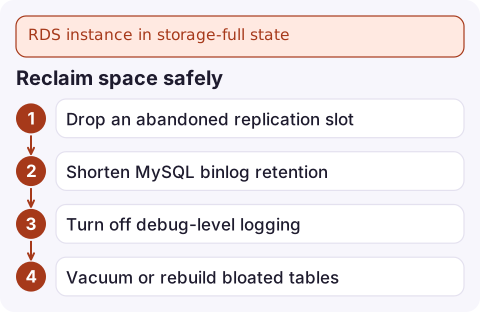
Reclaim space safely
- Drop an abandoned replication slot once you are sure nothing uses it:
SELECT pg_drop_replication_slot('old_slot');. - Shorten MySQL binlog retention:
CALL mysql.rds_set_configuration('binlog retention hours', 24);(check replicas and CDC tools first). - Turn off debug-level logging in the parameter group.
- Vacuum or rebuild bloated tables during a quiet period; a full rewrite needs free space to run, which is another reason to add storage first.
Never again: autoscaling and alarms
Enable storage autoscaling by setting a ceiling above the current size; RDS then grows storage when free space runs low:
aws rds modify-db-instance --db-instance-identifier orders-db \
  --max-allocated-storage 500 --apply-immediately
Autoscaling also respects the six-hour cooldown, so a sudden flood of writes can still fill the disk. Keep an alarm on FreeStorageSpace: see the FreeStorageSpace alarm.
Questions
Can I reduce RDS allocated storage after increasing it?
No. Allocated storage can only grow. To shrink, create a new instance with less storage and migrate the data, for example with a dump and restore or AWS DMS.
Does increasing RDS storage cause downtime?
Generally no, the change is applied online, but I/O performance can be affected while storage optimisation runs.
Why can't I modify RDS storage again?
After a storage modification, RDS blocks further storage changes for six hours or until storage optimisation completes, whichever is longer.

A database running out of disk takes the whole application with it, usually outside working hours. CloudConsole, a phone app for AWS, is built to show a FreeStorageSpace alarm and the instance's state on your phone, ideally before it reaches zero.
Did it start after a deploy? What changed? on the app’s alarm screen lists the deploys and configuration changes from the hour before the alarm fired.
About the app → · Download on the App Store