 CloudConsole
InvalidChangeBatch: Tried to create resource record set but it already exists
A CREATE action in your change batch targets a record (name and type, plus set identifier for routing policies) that already exists in that hosted zone. Use UPSERT to create-or-replace, or DELETE the old record in the same batch first. Also confirm you are writing to the zone you think you are: public and private zones can share a name.
What it means
An error occurred (InvalidChangeBatch) when calling the ChangeResourceRecordSets
operation: [Tried to create resource record set [name='www.example.com.', type='A']
but it already exists]
Route 53 identifies a record by its name and type, and for weighted, latency, geolocation, failover and other routing policies also by SetIdentifier. CREATE only works if that combination is new. Change batches are atomic, so one failing change means none of the changes in the batch were applied.
See what is already there
aws route53 list-resource-record-sets --hosted-zone-id Z0123456789ABCDEFGHIJ \
  --query "ResourceRecordSets[?Name=='www.example.com.']"
Note the trailing dot: names are stored fully qualified. If the output is empty but the error persists, you may be looking at a different zone from the one your tool writes to. List zones with that name:
aws route53 list-hosted-zones-by-name --dns-name example.com \
  --query 'HostedZones[].{id:Id,name:Name,private:Config.PrivateZone,records:ResourceRecordSetCount}'
Fix: UPSERT instead of CREATE
UPSERT creates the record if it is missing and replaces it if present:
{
  "Comment": "point www at the new ALB",
  "Changes": [{
    "Action": "UPSERT",
    "ResourceRecordSet": {
      "Name": "www.example.com",
      "Type": "A",
      "AliasTarget": {
        "HostedZoneId": "Z0ALBZONEEXAMPLE",
        "DNSName": "my-alb-1234567890.eu-west-2.elb.amazonaws.com",
        "EvaluateTargetHealth": true
      }
    }
  }]
}
aws route53 change-resource-record-sets --hosted-zone-id Z0123456789ABCDEFGHIJ \
--change-batch file://change.json
aws route53 get-change --id C0123456789ABCDEFGHIJ --query ChangeInfo.StatusThe HostedZoneId inside an alias target is the load balancer's (or CloudFront's) canonical zone ID, not your own; read it from the load balancer's description. The change is live in Route 53 once get-change reports INSYNC; resolvers that cached the old answer keep it until its TTL expires.
Related InvalidChangeBatch messages
| Message | Fix |
|---|---|
| RRSet of type CNAME with DNS name ... is not permitted as it conflicts with other records with the same DNS name | A CNAME cannot coexist with any other record at the same name; delete the others or use an alias A/AAAA record instead |
| Tried to delete resource record set ... but it was not found | DELETE must match the existing record exactly: name, type, TTL and values |
| Tried to delete ... but the values provided do not match the current values | Copy the current record from list-resource-record-sets into the DELETE |
| Errors about missing SetIdentifier | Records with a routing policy each need a unique SetIdentifier |
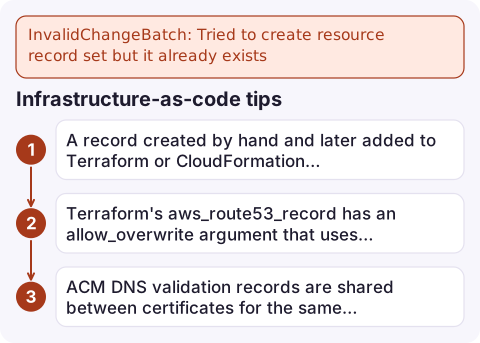
Infrastructure-as-code tips
- A record created by hand and later added to Terraform or CloudFormation causes this error on the first apply. Import it into state, or delete it and let the tool create it.
- Terraform's
aws_route53_recordhas anallow_overwriteargument that uses UPSERT semantics; use it deliberately, because it can silently take over a record another stack manages. - ACM DNS validation records are shared between certificates for the same domain, so two stacks requesting certificates for one name can collide on the validation CNAME.
Questions
What is the difference between CREATE and UPSERT in Route 53?
CREATE fails if a record with the same name, type and set identifier exists. UPSERT creates it if missing or replaces it if present.
Why does Route 53 say a record exists when I cannot see it?
You may be looking at a different hosted zone with the same domain name, such as a private zone versus the public one. Check the zone ID your tool uses.
Can I have a CNAME and other records with the same name?
No. A CNAME must be the only record at its name. Use an alias A or AAAA record if you need to point the name at an AWS resource alongside other records.

DNS changes are often made during a cutover, when a failed batch means traffic still goes to the old place. CloudConsole, a phone app for AWS, is built to show health check alarms and resource state on your phone, which helps confirm a cutover actually took effect.
Did it start after a deploy? What changed? on the app’s alarm screen lists the deploys and configuration changes from the hour before the alarm fired.
About the app → · Download on the App Store