 CloudConsole
How to cancel a CloudFormation stack update
While a stack is in UPDATE_IN_PROGRESS, run aws cloudformation cancel-update-stack --stack-name NAME, or choose Stack actions > Cancel update stack in the console. CloudFormation stops the update and rolls back to the last known good configuration. You can't cancel creates, cleanups or rollbacks, and the rollback itself may wait on the same resource that made the update slow.
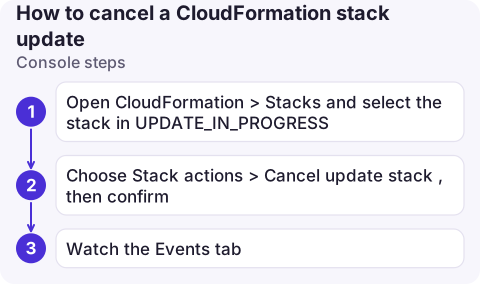
Console steps
- Open CloudFormation > Stacks and select the stack in
UPDATE_IN_PROGRESS. - Choose Stack actions > Cancel update stack, then confirm.
- Watch the Events tab: you'll see
UPDATE_ROLLBACK_IN_PROGRESS, resources reverting, thenUPDATE_ROLLBACK_COMPLETE.
If the option is greyed out, the stack is in a state that can't be cancelled; the table below shows what to do instead.
CLI steps
aws cloudformation describe-stacks --stack-name orders \
  --query 'Stacks[0].[StackStatus,StackStatusReason]' --output text

aws cloudformation cancel-update-stack --stack-name orders

aws cloudformation wait stack-rollback-complete --stack-name orders
aws cloudformation describe-stack-events --stack-name orders --max-items 15 \
--query 'StackEvents[].[LogicalResourceId,ResourceStatus,ResourceStatusReason]' --output table| Current status | What you can do |
|---|---|
UPDATE_IN_PROGRESS | cancel-update-stack |
CREATE_IN_PROGRESS | Can't cancel; wait, or delete the stack (it rolls back first) |
UPDATE_COMPLETE_CLEANUP_IN_PROGRESS | Update already succeeded; wait for cleanup |
UPDATE_FAILED (rollback disabled) | aws cloudformation rollback-stack --stack-name orders, or fix and update again |
UPDATE_ROLLBACK_FAILED | continue-update-rollback, skipping stuck resources if needed |
Before you cancel
- Find what it's waiting on. The newest
IN_PROGRESSresource in the events is usually the reason the update is slow. If it's an ECS service whose new tasks fail, the rollback will deploy the old task definition, which should stabilise. If it's a custom resource with a broken handler, the rollback calls the same handler and can hang just as long. - Check for replacements. If the update already replaced a resource (a new RDS instance, a new bucket name), the rollback switches back to the old one and deletes the new one during cleanup. Data written to the new resource in between is lost.
- Nested stacks: cancel on the root stack, not the nested one.
Afterwards
UPDATE_ROLLBACK_COMPLETEis a healthy, updatable state; fix the template and update again.- Use
--disable-rollback(or Preserve successfully provisioned resources in the console) on the next attempt if you want to debug a failure without losing progress, thenrollback-stackor fix forward. - Turn on the ECS deployment circuit breaker so failing services fail the update quickly instead of hanging it.
Common mistakes
- Cancelling, then immediately updating again: you'll get stack is in UPDATE_ROLLBACK_IN_PROGRESS state and can not be updated. Wait for the rollback.
- Fixing the stuck resource by hand mid-rollback (deleting it, changing it) often turns a slow rollback into
UPDATE_ROLLBACK_FAILED. - Expecting cancel to stop immediately: in-flight resource operations finish first.
Questions
How do I cancel a CloudFormation update?
Run aws cloudformation cancel-update-stack --stack-name NAME while the stack is in UPDATE_IN_PROGRESS, or choose Stack actions > Cancel update stack in the console.
Can I cancel a CloudFormation stack creation?
No. You can wait, or delete the stack, which rolls back the creation and removes the resources.
How do I roll back a CloudFormation stack in UPDATE_FAILED?
If the update ran with rollback disabled, run aws cloudformation rollback-stack, or fix the template and update again.

Deciding whether to cancel a slow update is easier when you can see the service it's waiting on. CloudConsole, a phone app for AWS, is being built to show stack-related resources, events and alarms on your phone.
About the app → · Download on the App Store