 CloudConsole
How to disable a Lambda SQS trigger
Disable the event source mapping: in the Lambda console open Configuration > Triggers, select the SQS trigger, Edit, clear Activate trigger and save; or run aws lambda update-event-source-mapping --uuid UUID --no-enabled. Lambda stops polling, messages stay in the queue, and they're processed when you enable it again, as long as they're still within the queue's retention period. Don't use reserved concurrency 0 for this; it can push messages to the dead-letter queue.
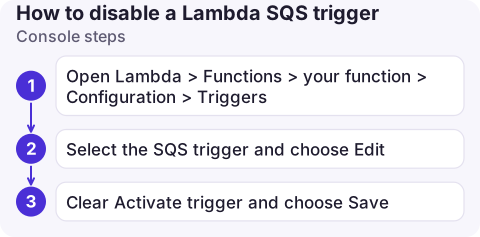
Console steps
- Open Lambda > Functions > your function > Configuration > Triggers.
- Select the SQS trigger and choose Edit.
- Clear Activate trigger and choose Save. The state moves from Disabling to Disabled after a short while.
You can also do this from the queue: SQS > Queues > your queue > Lambda triggers lists the mappings.
CLI steps
# Find the mapping's UUID
aws lambda list-event-source-mappings --function-name process-orders \
  --query 'EventSourceMappings[].[UUID,EventSourceArn,State]' --output table

# Pause
aws lambda update-event-source-mapping --uuid 14e0db71-1234-4abc-9def-0123456789ab --no-enabled

# Confirm (Disabling -> Disabled)
aws lambda get-event-source-mapping --uuid 14e0db71-1234-4abc-9def-0123456789ab --query State

# Resume later
aws lambda update-event-source-mapping --uuid 14e0db71-1234-4abc-9def-0123456789ab --enabled
The mapping's State goes through Disabling to Disabled; enabling goes through Enabling to Enabled. While it's disabled, the function's Invocations metric for this source drops to zero and the queue's ApproximateNumberOfMessagesVisible starts to climb, which confirms that polling has stopped.
What happens to messages
- Waiting messages stay in the queue and keep ageing. The queue's retention period (four days by default, up to 14) still applies; if the pause outlasts it, messages are deleted.
- In-flight batches already handed to the function finish normally; disabling isn't instantaneous.
- Producers are unaffected and keep sending, so watch the backlog: see check SQS queue depth and the oldest-message age.
- Resume gently: when you re-enable, Lambda scales up pollers and can hit a recovering downstream hard. Set maximum concurrency on the mapping (
--scaling-config MaximumConcurrency=5) before re-enabling.
Why not reserved concurrency 0?
Setting the function's reserved concurrency to 0 also stops processing, but for SQS the pollers keep receiving messages and the invocations are throttled. Each receive counts towards the queue's maxReceiveCount, so messages can be moved to the dead-letter queue even though your code never ran. Disabling the mapping avoids that. Reserved concurrency 0 is the right tool for stopping a function invoked by other sources; see stop a Lambda function.
If you need the function itself to stop for all sources at once, do both: disable the SQS mapping first, then throttle the function.
Common mistakes
- Deleting the trigger instead of disabling it: you lose settings like batch size, filters and partial batch responses, and must recreate it.
- Forgetting infrastructure code: the next CloudFormation or Terraform deploy may set
Enabled: trueagain. - Pausing the wrong mapping: a function can have several SQS triggers; check the
EventSourceArn.
Questions
How do I pause a Lambda SQS trigger?
Disable the event source mapping: clear Activate trigger in the console, or run aws lambda update-event-source-mapping --uuid UUID --no-enabled.
Are SQS messages lost when I disable the Lambda trigger?
No, they stay in the queue until the trigger is enabled again, unless they exceed the queue's message retention period.
Should I set reserved concurrency to 0 to stop an SQS-triggered Lambda?
It's better to disable the event source mapping. With concurrency 0, messages can be received and throttled repeatedly and end up in the dead-letter queue.

Pausing a consumer is a common way to protect a struggling downstream during an incident. CloudConsole, a phone app for AWS, is being built to show queue depth, Lambda errors and alarms on your phone, so you can watch the backlog while it's paused.
About the app → · Download on the App Store