 CloudConsole
How to find which Lambda function is throttled
Look at the CloudWatch metric AWS/Lambda Throttles, per FunctionName, for the last few hours: any function with a non-zero Sum was throttled. Then check why: a reserved concurrency limit on that function, the account's Regional concurrency limit being used up by other functions (ConcurrentExecutions near the limit), or provisioned concurrency spillover. aws lambda get-account-settings shows the account limit.
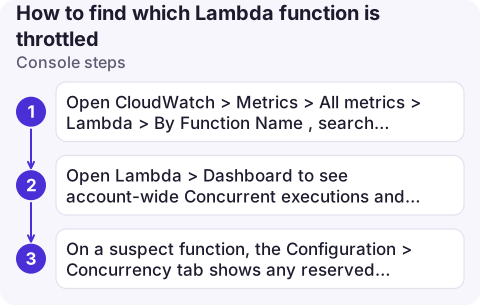
Console steps
- Open CloudWatch > Metrics > All metrics > Lambda > By Function Name, search
Throttles, select all, set the statistic to Sum and the period to 1 minute. The functions with lines above zero are your answer. - Open Lambda > Dashboard to see account-wide Concurrent executions and Throttles.
- On a suspect function, the Configuration > Concurrency tab shows any reserved or provisioned concurrency.
CLI steps
# Account limit and what's left unreserved
aws lambda get-account-settings \
  --query 'AccountLimit.[ConcurrentExecutions,UnreservedConcurrentExecutions]'

# Throttles per function over the last 3 hours (one metric query per function)
for f in $(aws lambda list-functions --query 'Functions[].FunctionName' --output text); do
  n=$(aws cloudwatch get-metric-statistics --namespace AWS/Lambda --metric-name Throttles \
      --dimensions Name=FunctionName,Value=$f --statistics Sum --period 10800 \
      --start-time $(date -u -d '-3 hours' +%FT%TZ) --end-time $(date -u +%FT%TZ) \
      --query 'Datapoints[0].Sum' --output text)
  [ "$n" != "None" ] && [ "$n" != "0.0" ] && echo "$n $f"
done | sort -rn

# Does that function have a reserved limit?
aws lambda get-function-concurrency --function-name process-orders
On macOS use date -u -v-3H instead of -d '-3 hours'. For many functions, get-metric-data with a SEARCH expression does this in one call.
Work out why
| What you see | Cause | Fix |
|---|---|---|
| One function throttled; it has reserved concurrency | Its own cap | Raise reserved concurrency, or accept it as intended back-pressure |
Many functions throttled; account ConcurrentExecutions near the limit | Account pool exhausted, often by one noisy function | Find the function using the most concurrency and cap it; request a quota increase |
| Throttles only during bursts | Scaling rate: each function can add concurrency at a limited rate per 10 seconds | Provisioned concurrency for predictable spikes, or smooth input with a queue |
| Function set to 0 reserved concurrency | Someone switched it off | See stop a Lambda function |
What throttling looks like to callers
- Synchronous (API Gateway, SDK invoke): HTTP 429
TooManyRequestsException; see Rate exceeded. - Asynchronous (S3, SNS, EventBridge): Lambda retries throttled events for up to six hours by default, so callers see nothing, but events arrive late or end up in the on-failure destination.
- SQS triggers: messages return to the queue and are retried; queue age grows.
Common mistakes
- Raising the account quota when one runaway function is the real problem; it will consume the new headroom too.
- Setting reserved concurrency on every function: reserved amounts are taken out of the shared pool, which can starve unreserved functions.
- Reading
Throttleswith the Average statistic; use Sum.
Questions
Which metric shows Lambda throttling?
Throttles in the AWS/Lambda namespace, per FunctionName. Use the Sum statistic; any non-zero value means invocations were throttled.
What is the default Lambda concurrency limit?
Each account has a Regional concurrency quota shared by all functions; check yours with aws lambda get-account-settings. It can be raised through Service Quotas.
Why is my Lambda throttled when concurrency is below the limit?
The function may have reserved concurrency, or it is scaling faster than Lambda's per-function scaling rate during a burst.

Throttling often starts with one function and spreads to others sharing the pool. CloudConsole, a phone app for AWS, is being built to show Lambda metrics and throttle alarms on your phone, so you can see which function is involved straight away.
About the app → · Download on the App Store