 CloudConsole
How to get an EC2 instance ID
In the EC2 console the Instance ID column on the Instances page shows it (i-0123456789abcdef0). From the CLI, filter describe-instances by Name tag, IP or other attributes and query InstanceId. From inside the instance, ask the instance metadata service: request an IMDSv2 token, then read latest/meta-data/instance-id.
From the CLI
# By Name tag
aws ec2 describe-instances \
  --filters Name=tag:Name,Values=web-1 Name=instance-state-name,Values=running \
  --query 'Reservations[].Instances[].InstanceId' --output text

# All instances with their names, as a table
aws ec2 describe-instances \
  --query 'Reservations[].Instances[].[InstanceId,Tags[?Key==`Name`]|[0].Value,State.Name,PrivateIpAddress]' \
  --output table

# By private IP
aws ec2 describe-instances --filters Name=private-ip-address,Values=10.0.1.25 \
  --query 'Reservations[].Instances[].InstanceId' --output text

# Members of an Auto Scaling group
aws autoscaling describe-auto-scaling-groups --auto-scaling-group-names web-asg \
  --query 'AutoScalingGroups[].Instances[].InstanceId' --output text
Results are per Region; add --region if the instance isn't in your default one. Tag values are case-sensitive and support * wildcards.
From inside the instance
Linux (IMDSv2):
TOKEN=$(curl -sX PUT http://169.254.169.254/latest/api/token \
  -H "X-aws-ec2-metadata-token-ttl-seconds: 300")
curl -s -H "X-aws-ec2-metadata-token: $TOKEN" \
  http://169.254.169.254/latest/meta-data/instance-id
On Amazon Linux, the ec2-metadata helper does the same: ec2-metadata --instance-id.
Windows (PowerShell):
$token = Invoke-RestMethod -Method PUT -Uri http://169.254.169.254/latest/api/token `
  -Headers @{"X-aws-ec2-metadata-token-ttl-seconds" = "300"}
Invoke-RestMethod -Uri http://169.254.169.254/latest/meta-data/instance-id `
  -Headers @{"X-aws-ec2-metadata-token" = $token}
When metadata calls fail
| Symptom | Cause |
|---|---|
401 Unauthorized | The instance requires IMDSv2 and you called without a token (old scripts using plain curl on the metadata path) |
| Token request hangs from inside a Docker container | The metadata hop limit is 1, so the response doesn't reach the container. Raise it to 2 with aws ec2 modify-instance-metadata-options --instance-id i-0123456789abcdef0 --http-put-response-hop-limit 2 |
| Connection refused or timeout | The metadata service is disabled for the instance, or a local firewall or proxy setting intercepts 169.254.169.254 (add it to NO_PROXY) |
| Works on EC2, not on ECS Fargate | Fargate tasks don't expose EC2 instance metadata; use the ECS task metadata endpoint instead |
In the console
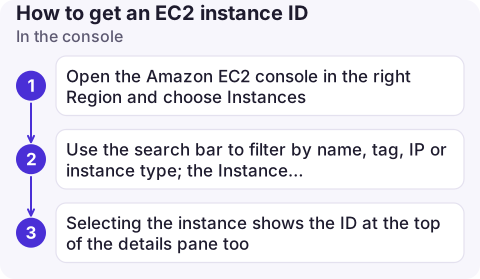
- Open the Amazon EC2 console in the right Region and choose Instances.
- Use the search bar to filter by name, tag, IP or instance type; the Instance ID column shows the ID, with a copy button next to it.
- Selecting the instance shows the ID at the top of the details pane too.
Other consoles show it where relevant: an Auto Scaling group's instance management tab, a target group's targets, or the ECS container instance details for EC2-backed clusters.
Common mistakes
- Confusing the instance ID with the AMI ID (
ami-), volume ID (vol-) or network interface (eni-). - Hardcoding IDs in scripts for instances that Auto Scaling replaces; look them up by tag each time.
- Searching the wrong Region and concluding the instance doesn't exist; see InvalidInstanceID.NotFound.
Questions
How do I find the instance ID from the command line on the instance itself?
Request an IMDSv2 token from http://169.254.169.254/latest/api/token, then call latest/meta-data/instance-id with that token in the X-aws-ec2-metadata-token header.
How do I get an instance ID from its name with the AWS CLI?
aws ec2 describe-instances --filters Name=tag:Name,Values=web-1 --query Reservations[].Instances[].InstanceId --output text.
What does an EC2 instance ID look like?
It starts with i- followed by 17 hexadecimal characters, for example i-0123456789abcdef0. Some older instances have 8 characters after the prefix.

Instance IDs are what alarms and logs refer to, and they are hard to type on a phone. CloudConsole, a phone app for AWS, is built to link alarms straight to the resource they are about.
About the app → · Download on the App Store