 CloudConsole
How to kill a running query on Amazon RDS
On RDS you don't get a true superuser, so use the engine's sanctioned functions. PostgreSQL: find the pid in pg_stat_activity, then SELECT pg_cancel_backend(pid) to cancel the query or pg_terminate_backend(pid) to end the session (the master user has rds_superuser, which can do this for non-superuser sessions). MySQL and MariaDB: find the thread ID in the process list, then CALL mysql.rds_kill_query(id) to stop the statement or CALL mysql.rds_kill(id) to drop the connection.
PostgreSQL (RDS and Aurora)
-- Longest-running active queries
SELECT pid, usename, application_name, client_addr,
       now() - query_start AS runtime, wait_event_type, left(query, 100) AS query
FROM pg_stat_activity
WHERE state = 'active' AND pid <> pg_backend_pid()
ORDER BY runtime DESC;

-- Gentle: cancel the current statement, keep the connection
SELECT pg_cancel_backend(12345);

-- Firm: end the whole session (rolls back its open transaction)
SELECT pg_terminate_backend(12345);
Also look for state = 'idle in transaction' sessions with old xact_start: they hold locks and block vacuum without using CPU. To stop one query type in bulk, select the pids with a WHERE query LIKE ... filter and pass them to pg_terminate_backend, after reviewing the list.
MySQL and MariaDB (RDS and Aurora MySQL)
-- What is running
SELECT id, user, host, db, time, state, left(info, 100) AS query
FROM information_schema.processlist
WHERE command <> 'Sleep'
ORDER BY time DESC;

-- Stop the statement only
CALL mysql.rds_kill_query(4321);

-- Drop the connection
CALL mysql.rds_kill(4321);
Plain KILL works for your own connections, but for sessions belonging to other users use the RDS procedures, because the master user doesn't have the SUPER privilege. The same procedures work on Aurora MySQL.
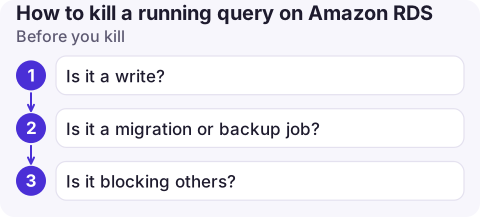
Before you kill
- Is it a write? Killing a large
UPDATEorDELETEstarts a rollback that can take as long as the work done so far. In MySQL the thread showsKilled/rolling back; don't restart the instance to hurry it, as recovery has to do the same work. - Is it a migration or backup job? Check
application_name/userand the host before acting. - Is it blocking others? On PostgreSQL,
SELECT pid, pg_blocking_pids(pid) FROM pg_stat_activity WHERE cardinality(pg_blocking_pids(pid)) > 0;finds the session at the head of a lock chain. Kill that one, not the waiters.
Stop it happening again
- PostgreSQL: set
statement_timeoutandidle_in_transaction_session_timeoutper role or in the DB parameter group, for exampleALTER ROLE reporting SET statement_timeout = '5min'; - MySQL:
max_execution_timelimits read-onlySELECTstatements (milliseconds) and can be set in the parameter group or per session. - Send long reports to a read replica, and find the worst offenders with RDS high CPU troubleshooting.
Common mistakes
- Rebooting the instance to stop a query: every connection drops, caches go cold, and rollbacks still have to finish.
- Killing the connection pooler's session rather than the client's: with RDS Proxy or PgBouncer the visible client is the pooler.
- Assuming the kill worked: re-run the activity query; a terminating session can linger while it rolls back.
Questions
How do I kill a query in RDS PostgreSQL?
Find the pid in pg_stat_activity, then run SELECT pg_cancel_backend(pid) to cancel the query or pg_terminate_backend(pid) to end the session.
How do I kill a process in RDS MySQL?
Use CALL mysql.rds_kill_query(thread_id) to stop the statement or CALL mysql.rds_kill(thread_id) to end the connection, with the ID from the process list.
Why can't I use KILL on RDS MySQL?
The RDS master user doesn't have the SUPER privilege, so killing other users' threads needs the mysql.rds_kill procedures.

A single runaway query can take a whole application down. CloudConsole, a phone app for AWS, is being built to show RDS metrics and alarms on your phone, so you can spot the spike and decide quickly whether a query needs stopping.
About the app → · Download on the App Store