 CloudConsole
How to restore a DynamoDB table to a point in time
If point-in-time recovery (PITR) is turned on, restore with aws dynamodb restore-table-to-point-in-time --source-table-name orders --target-table-name orders-restored --restore-date-time TIMESTAMP, or Backups > Restore to point in time in the console. DynamoDB always restores into a new table; you can't overwrite the original. Auto scaling, IAM policies, alarms, tags, Streams, TTL and PITR settings aren't carried over, so set them up before pointing traffic at it.
Check PITR and the restore window
aws dynamodb describe-continuous-backups --table-name orders \
  --query 'ContinuousBackupsDescription.PointInTimeRecoveryDescription'
You need PointInTimeRecoveryStatus: ENABLED. EarliestRestorableDateTime and LatestRestorableDateTime give the window; the recovery period is configurable from 1 to 35 days. If PITR was off at the time you need, look for an on-demand backup or an AWS Backup recovery point instead. Turning PITR on now doesn't help with the past.
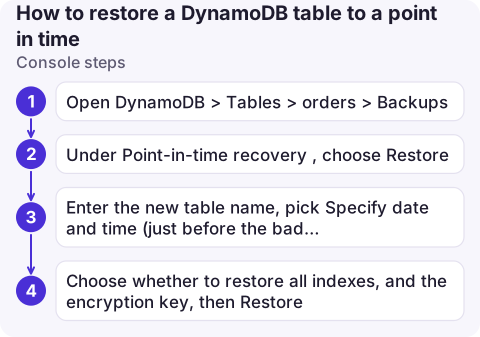
Console steps
- Open DynamoDB > Tables > orders > Backups.
- Under Point-in-time recovery, choose Restore.
- Enter the new table name, pick Specify date and time (just before the bad change) or Latest restorable time.
- Choose whether to restore all indexes, and the encryption key, then Restore. The new table shows Restoring until it becomes Active.
CLI steps
aws dynamodb restore-table-to-point-in-time \
  --source-table-name orders \
  --target-table-name orders-restored-20261117 \
  --restore-date-time 2026-11-17T08:55:00Z

aws dynamodb wait table-exists --table-name orders-restored-20261117
aws dynamodb describe-table --table-name orders-restored-20261117 \
  --query 'Table.[TableStatus,ItemCount,TableSizeBytes]'
Restore time depends on table size and isn't instant; large tables can take hours. Find the timestamp of the bad change in CloudTrail if writes were made through the API (see find who deleted a resource); note that item-level writes are data events, recorded only if a trail logs them.
Useful options: --use-latest-restorable-time instead of a timestamp, --billing-mode-override PAY_PER_REQUEST to avoid sizing provisioned capacity for a temporary copy, and --global-secondary-index-override to restore without indexes you don't need, which is faster.
After the restore
- Recreate what isn't copied: auto scaling policies, IAM policies referencing the table name, CloudWatch alarms, tags, Streams, TTL, and PITR itself on the new table.
- Choose how to recover: either point the app at the restored table (config change, new name), or copy back only the damaged items into the original with a script, which keeps the original's name, streams and alarms. For a few bad items, copying back is usually safer.
- Writes since the restore point exist only in the original. Reconcile them before switching.
- Deleted table? If the table itself was deleted while PITR was on, DynamoDB automatically kept a system backup at deletion time; restore it from the Backups page of the DynamoDB console.
Common mistakes
- Using local time for
--restore-date-time; give UTC with aZ. - Forgetting global tables: a restore creates a single-Region table; add replicas afterwards.
- Leaving the restored copy running after copying data back; it's billed like any table.
Questions
Can I restore a DynamoDB table over the existing table?
No. Point-in-time recovery always creates a new table. Point your application at it, or copy the needed items back into the original.
How far back can DynamoDB point-in-time recovery go?
Up to the configured recovery period, between 1 and 35 days, and never earlier than when PITR was enabled.
What settings are not restored with DynamoDB PITR?
Auto scaling policies, IAM policies, CloudWatch metrics and alarms, tags, Streams settings, TTL settings and PITR settings must be set up again on the new table.

Data loss incidents start with working out exactly when things went wrong. CloudConsole, a phone app for AWS, is being built to show resources, alarms and logs on your phone, which helps you pin down the moment to restore to.
About the app → · Download on the App Store