 CloudConsole
How to run a command on multiple EC2 instances
Use AWS Systems Manager Run Command: aws ssm send-command --document-name AWS-RunShellScript --targets Key=tag:Role,Values=web --parameters 'commands=["uptime"]' runs the command on every managed instance with that tag, with no SSH. Set --max-concurrency and --max-errors so a bad command doesn't hit the whole fleet, then read per-instance results with list-command-invocations --details. Instances need the SSM Agent and an instance profile allowing Systems Manager.
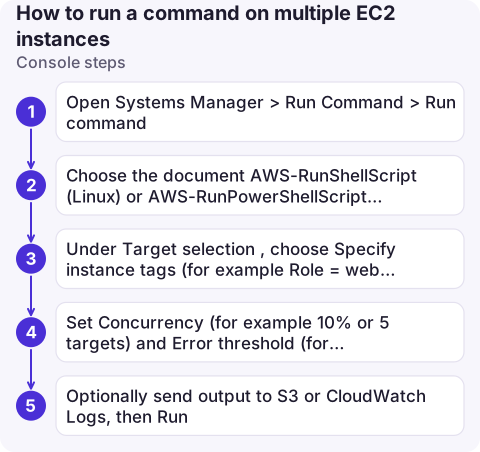
Console steps
- Open Systems Manager > Run Command > Run command.
- Choose the document AWS-RunShellScript (Linux) or AWS-RunPowerShellScript (Windows) and enter the commands.
- Under Target selection, choose Specify instance tags (for example
Role = web) or pick instances manually. - Set Concurrency (for example 10% or 5 targets) and Error threshold (for example 1).
- Optionally send output to S3 or CloudWatch Logs, then Run. The command page shows status and output per instance.
CLI steps
CMD_ID=$(aws ssm send-command \
  --document-name AWS-RunShellScript \
  --targets Key=tag:Role,Values=web Key=tag:Env,Values=prod \
  --parameters 'commands=["df -h /","systemctl is-active nginx"]' \
  --max-concurrency 20% --max-errors 1 \
  --timeout-seconds 600 \
  --comment "disk and nginx check" \
  --cloud-watch-output-config CloudWatchOutputEnabled=true,CloudWatchLogGroupName=/ssm/run-command \
  --query Command.CommandId --output text)

# Status per instance
aws ssm list-command-invocations --command-id $CMD_ID \
  --query 'CommandInvocations[].[InstanceId,InstanceName,Status]' --output table

# Output from one instance
aws ssm get-command-invocation --command-id $CMD_ID --instance-id i-0123456789abcdef0 \
  --query '[Status,StandardOutputContent,StandardErrorContent]' --output text
Multiple --targets keys are ANDed. You can also target --instance-ids directly (up to 50) or a resource group.
Check before you run
- Which instances will match?
aws ssm describe-instance-information --filters Key=tag:Role,Values=web --query 'InstanceInformationList[].[InstanceId,PingStatus,PlatformName]'lists managed, online instances with that tag. Instances not listed won't run the command at all. - Is it safe at scale? Restarts and package updates on 20% of a fleet at once can drop capacity below what the load balancer needs. Start with
--max-concurrency 1. - Output limits: the API returns only the first part of long output (the console shows even less). Send output to S3 or CloudWatch Logs for anything long.
- Runs as root on Linux. Commands that need a user's environment should
sudo -uexplicitly.
Common mistakes
- Instances missing from the run: SSM Agent stopped, no instance profile with
AmazonSSMManagedInstanceCore, or no route to the SSM endpoints. See TargetNotConnected. - Quoting:
commandsis a JSON list of strings. Complex scripts are easier as a file passed with--parameters file://params.json. - Long tasks hitting the timeout:
--timeout-secondsis how long to wait for delivery; per-command execution time is the document'sexecutionTimeoutparameter, 3600 seconds by default for AWS-RunShellScript. - Using it for interactive work: for a shell, use Session Manager.
Questions
How do I run a command on multiple EC2 instances without SSH?
Use Systems Manager Run Command with the AWS-RunShellScript document and target instances by tag with aws ssm send-command --targets.
How do I see the output of an SSM Run Command?
Run aws ssm get-command-invocation with the command ID and instance ID, or list-command-invocations --details for all instances. Send output to S3 or CloudWatch Logs for long results.
Why does my instance not appear in SSM Run Command?
It isn't a managed node: the SSM Agent isn't running, the instance profile lacks AmazonSSMManagedInstanceCore, or it can't reach the Systems Manager endpoints.

Fleet-wide checks are often the first thing you want during an incident. CloudConsole, a phone app for AWS, is being built to show instance status, alarms and logs on your phone with production guardrails, so you can see which hosts are affected.
About the app → · Download on the App Store