 CloudConsole
IAM policy: start and stop EC2 instances by tag
Allow ec2:StartInstances, ec2:StopInstances and ec2:RebootInstances on instance ARNs with a condition on aws:ResourceTag, allow ec2:DescribeInstances on "*" (it has no resource-level permissions), and deny ec2:CreateTags and ec2:DeleteTags on that tag key so users can't retag other instances into scope.
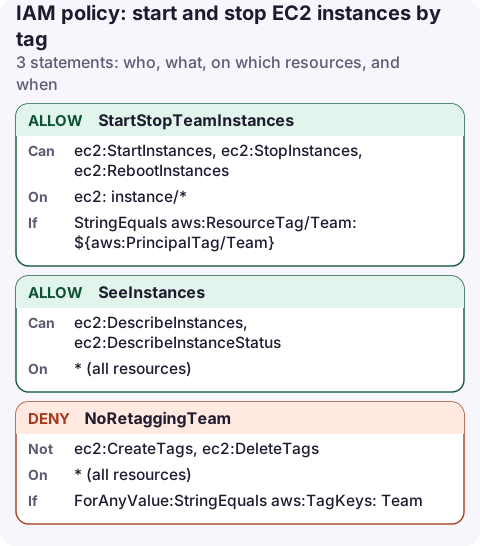
The policy
{
  "Version": "2012-10-17",
  "Statement": [
    {
      "Sid": "StartStopTeamInstances",
      "Effect": "Allow",
      "Action": [
        "ec2:StartInstances",
        "ec2:StopInstances",
        "ec2:RebootInstances"
      ],
      "Resource": "arn:aws:ec2:eu-west-2:123456789012:instance/*",
      "Condition": {
        "StringEquals": {
          "aws:ResourceTag/Team": "${aws:PrincipalTag/Team}"
        }
      }
    },
    {
      "Sid": "SeeInstances",
      "Effect": "Allow",
      "Action": [
        "ec2:DescribeInstances",
        "ec2:DescribeInstanceStatus"
      ],
      "Resource": "*"
    },
    {
      "Sid": "NoRetaggingTeam",
      "Effect": "Deny",
      "Action": [
        "ec2:CreateTags",
        "ec2:DeleteTags"
      ],
      "Resource": "*",
      "Condition": {
        "ForAnyValue:StringEquals": {
          "aws:TagKeys": [
            "Team"
          ]
        }
      }
    }
  ]
}
How it works
- StartStopTeamInstances: the instance's
Teamtag must equal the caller's ownTeamtag. Tag the IAM role, user, or (with IAM Identity Center) pass it as a session tag. One policy then serves every team. For a fixed value, use"aws:ResourceTag/Team": "analytics". - SeeInstances:
DescribeInstancesdoesn't support resource-level permissions, so everyone with this policy can see all instances in the account. They just can't act on them. - NoRetaggingTeam: without it, a user with tagging rights elsewhere could add
Team=analyticsto a production instance and then stop it.
Leave out ec2:TerminateInstances. Stop is reversible; terminate is not.
Attach and test
aws iam tag-role --role-name analytics-dev --tags Key=Team,Value=analytics
aws iam put-role-policy --role-name analytics-dev \
  --policy-name start-stop-team-instances --policy-document file://start-stop.json

aws ec2 stop-instances --instance-ids i-0123456789abcdef0 --profile analytics-dev
An instance without the tag returns UnauthorizedOperation with an encoded message; decode it to see which condition failed.
Variations
- Office hours only: add
"DateGreaterThan"/"DateLessThan"onaws:CurrentTime, though a scheduler is usually a better fit for that. - Allow launching tagged instances: that needs
ec2:RunInstanceson several resource types plusaws:RequestTagconditions; see ABAC with tags. - Auto Scaling instances: stopping them usually triggers a replacement. See stop an instance in an ASG.
See what a user can control
Because describe calls aren't filtered, users see every instance. A filter by tag shows only the ones this policy lets them start and stop:
aws ec2 describe-instances \
  --filters Name=tag:Team,Values=analytics \
  --query 'Reservations[].Instances[].[InstanceId,State.Name,Tags[?Key==`Name`]|[0].Value]' \
  --output table
Stop and start calls are recorded in CloudTrail with the caller's identity, so anyone using this policy leaves a clear trail. If an instance stops unexpectedly, find who stopped it from the StopInstances event.
Common mistakes
- Putting the tag condition on
DescribeInstances: the call fails or returns nothing, and the console shows an empty list. - Encrypted EBS volumes with a customer managed key: starting the instance can fail (often with
Client.InternalError) unless the caller may use the key, typicallykms:CreateGrantthrough EC2. - Tag key case:
teamandTeamare different tag keys in conditions. Pick one convention.
Questions
Can I restrict ec2:DescribeInstances by tag?
No. DescribeInstances doesn't support resource-level permissions or tag conditions, so it must be allowed on "*".
How do I stop users removing the tag that grants access?
Deny ec2:CreateTags and ec2:DeleteTags when aws:TagKeys contains that key, as in the third statement.
Stopping a runaway dev instance is a classic thing to do from a phone, and a tag-scoped policy makes it safe. CloudConsole is being built to show start and stop behind a confirmation, with production guardrails on top.
About the app → · Download on the App Store