 CloudConsole
IAM policy: write to one CloudWatch Logs log group
Allow logs:CreateLogStream and logs:PutLogEvents on the log group ARN followed by :*, for example arn:aws:logs:eu-west-2:123456789012:log-group:/my-app/production:*. Add logs:CreateLogGroup only if the app creates its own group, and logs:DescribeLogStreams if your logging library asks for it.
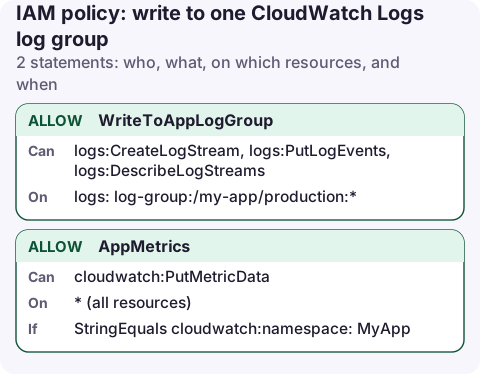
The policy
{
  "Version": "2012-10-17",
  "Statement": [
    {
      "Sid": "WriteToAppLogGroup",
      "Effect": "Allow",
      "Action": [
        "logs:CreateLogStream",
        "logs:PutLogEvents",
        "logs:DescribeLogStreams"
      ],
      "Resource": "arn:aws:logs:eu-west-2:123456789012:log-group:/my-app/production:*"
    },
    {
      "Sid": "AppMetrics",
      "Effect": "Allow",
      "Action": "cloudwatch:PutMetricData",
      "Resource": "*",
      "Condition": {
        "StringEquals": {
          "cloudwatch:namespace": "MyApp"
        }
      }
    }
  ]
}
How the ARN works
Log stream ARNs look like …:log-group:/my-app/production:log-stream:i-0123456789abcdef0. The pattern log-group:/my-app/production:* matches the group (which many APIs report with a trailing :*) and every stream inside it, so one resource covers both CreateLogStream (checked against the group) and PutLogEvents (checked against the stream).
- WriteToAppLogGroup: create streams, append events, and list streams, which older agents and some libraries call to find the right stream.
- AppMetrics (optional): the CloudWatch agent and embedded metric format libraries publish metrics with
PutMetricData, which has no resource ARN. Thecloudwatch:namespacecondition limits it to your namespace.
Attach it to an instance or task
aws iam put-role-policy --role-name my-app-ec2 \
  --policy-name write-logs --policy-document file://write-logs.json

aws logs describe-log-streams \
  --log-group-name /my-app/production \
  --order-by LastEventTime --descending --max-items 3
On EC2, the role reaches the agent through the instance profile; see EC2 instance roles. For the CloudWatch agent across many log groups, the managed CloudWatchAgentServerPolicy is simpler but grants writing to every log group in the account.
Variations
- Agent manages retention: if the agent config sets
retention_in_days, addlogs:PutRetentionPolicyon the group. - App creates its group: add
logs:CreateLogGrouponarn:aws:logs:eu-west-2:123456789012:log-group:/my-app/*. Creating groups yourself (with retention set) is usually better than letting apps create groups that keep data forever. - Log group encrypted with KMS: the writer needs no KMS permission; the key policy must allow the CloudWatch Logs service principal instead.
- Several environments: use
log-group:/my-app/*:*, accepting that staging can then write into production's group.
What failures look like
The CloudWatch agent writes its own log on the instance (on Linux, under /opt/aws/amazon-cloudwatch-agent/logs/). A missing permission appears there as an AccessDeniedException naming the action and the log group ARN, which tells you exactly which statement to fix. Application libraries usually log the same error to stderr.
aws iam simulate-principal-policy \
  --policy-source-arn arn:aws:iam::123456789012:role/my-app-ec2 \
  --action-names logs:PutLogEvents \
  --resource-arns arn:aws:logs:eu-west-2:123456789012:log-group:/my-app/production:log-stream:web-1
Common mistakes
- Group ARN without
:*:CreateLogStreamworks butPutLogEventsis denied, so streams appear with no events in them. - Agent running but no logs: check the agent's own log on the instance first; it states AccessDenied plainly.
- Using
logs:*: includesDeleteLogGroupand changing retention. A compromised host could erase its own trail. - Retention never set: logs are kept forever by default. See set log retention.
Questions
What permissions does an app need to write to CloudWatch Logs?
logs:CreateLogStream and logs:PutLogEvents on the log group ARN ending in :*, plus logs:CreateLogGroup if it creates the group.
Why are my log streams empty?
The policy allows CreateLogStream on the group but PutLogEvents is denied, usually because the resource lacks the trailing :* that matches the stream ARNs.
When an app goes quiet, check whether the log group stopped receiving events before assuming the app stopped. A phone that can tail a log group answers that in seconds.
About the app → · Download on the App Store