 CloudConsole
SCP: deny leaving the organisation
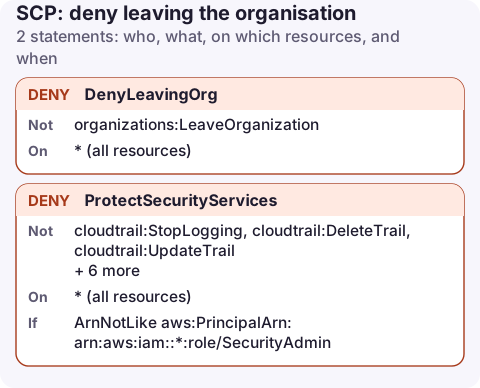
Attach an SCP with a Deny for organizations:LeaveOrganization on Resource * to the root or the OUs you want to protect. A member account can then no longer remove itself from the organisation, even with its root user, which would otherwise take it out of every other SCP too.
The policy
{
  "Version": "2012-10-17",
  "Statement": [
    {
      "Sid": "DenyLeavingOrg",
      "Effect": "Deny",
      "Action": "organizations:LeaveOrganization",
      "Resource": "*"
    },
    {
      "Sid": "ProtectSecurityServices",
      "Effect": "Deny",
      "Action": [
        "cloudtrail:StopLogging",
        "cloudtrail:DeleteTrail",
        "cloudtrail:UpdateTrail",
        "cloudtrail:PutEventSelectors",
        "guardduty:DeleteDetector",
        "guardduty:DisassociateFromAdministratorAccount",
        "config:StopConfigurationRecorder",
        "config:DeleteConfigurationRecorder",
        "config:DeleteDeliveryChannel"
      ],
      "Resource": "*",
      "Condition": {
        "ArnNotLike": {
          "aws:PrincipalArn": "arn:aws:iam::*:role/SecurityAdmin"
        }
      }
    }
  ]
}
Why each statement matters
DenyLeavingOrg: LeaveOrganization is called from inside the member account. If it succeeds, the account becomes standalone, so your SCPs, centralised CloudTrail and consolidated billing all stop applying. This is a common first step in an account takeover. One statement, no conditions, stops it.
ProtectSecurityServices stops anyone in member accounts, including their administrators, from disabling the services that would show what they did. The SecurityAdmin exception keeps a path for your security team to change configuration. If you use an organisation trail managed from the management account, member accounts can't modify it anyway, but this still covers trails created inside the account.
Create and attach it
aws organizations create-policy --name protect-org-guardrails \
  --type SERVICE_CONTROL_POLICY \
  --description "No leaving the org; protect CloudTrail, GuardDuty, Config" \
  --content file://protect-guardrails.json

aws organizations attach-policy --policy-id p-examplepolicyid111 \
  --target-id r-examplerootid111
Attaching to the root (r-…) covers every member account. SCPs need the "all features" mode of Organizations and must be enabled as a policy type on the root first.
How SCPs behave
- They never grant. An SCP sets the most a member account can do. The
FullAWSAccessSCP is attached by default; keep it, or nothing is allowed. - The management account is exempt. No SCP applies to it, which is one reason to run no workloads there.
- Service-linked roles are exempt, so AWS services keep working.
- Size limit: each SCP is limited to 5,120 characters, so group related statements and keep lists short.
See what is attached
aws organizations list-policies-for-target --target-id 111122223333 \
  --filter SERVICE_CONTROL_POLICY --query 'Policies[].Name'

aws organizations list-parents --child-id 111122223333
SCPs inherit down the OU tree, so an account is affected by policies on its OU, every parent OU and the root. Run list-policies-for-target for each level that list-parents returns to see the full set.
Keep a short description on every SCP and a naming convention for them. During an incident, "explicit deny in a service control policy" is only useful if you can quickly tell which policy, attached where, produced it.
Common mistakes
- Testing on the root first. Attach to a sandbox OU, check for breakage, then widen.
- Trying to close a member account through LeaveOrganization. Use the Organizations close-account flow from the management account instead; it isn't blocked by this SCP.
- Denying all of
guardduty:*: that also blocks reading findings. Deny only the destructive actions.
Questions
How do I stop an AWS account leaving my organisation?
Attach an SCP that denies organizations:LeaveOrganization to the root or the relevant OU. It applies to every principal in those member accounts.
Do SCPs apply to the management account?
No. SCPs only affect member accounts. Protect the management account with tight IAM and by keeping workloads out of it.
Guardrail SCPs are what make it reasonable to give on-call engineers broad access in member accounts. When an SCP blocks something during an incident, the error says so explicitly, which you can read from any device.
About the app → · Download on the App Store