 CloudConsole
How to check which AWS account the CLI is using
Run aws sts get-caller-identity. It returns the account ID, the ARN of the IAM user or assumed role, and a user ID, and it needs no IAM permissions, so it works with any valid credentials. aws configure list shows where those credentials and the Region came from (environment variables, a profile, SSO), which is what you need when the answer is not the account you expected.
The two commands
aws sts get-caller-identity
# {
#   "UserId": "AROAEXAMPLEID123456:[email protected]",
#   "Account": "123456789012",
#   "Arn": "arn:aws:sts::123456789012:assumed-role/AWSReservedSSO_Developer_0a1b2c3d4e5f6789/[email protected]"
# }

aws configure list
#       Name                    Value             Type    Location
#       ----                    -----             ----    --------
#    profile                 acme-dev           manual    --profile
# access_key     ****************WXYZ              sso
# secret_key     ****************abcd              sso
#     region                eu-west-2      config-file    ~/.aws/config
Add --profile name to either command to check a specific profile. To show the account's friendly name, aws iam list-account-aliases returns the alias if one is set (and if you're allowed to call it).
Reading the ARN
| ARN looks like | You are |
|---|---|
arn:aws:iam::123456789012:user/alex | An IAM user with long-term access keys |
arn:aws:sts::123456789012:assumed-role/Admin/session-name | A role session (from assume-role, a role profile, EC2, ECS or Lambda) |
…assumed-role/AWSReservedSSO_PermissionSet_…/[email protected] | An IAM Identity Center (SSO) sign-in |
arn:aws:iam::123456789012:root | The root user. Stop and use something else; root shouldn't have access keys. |
The UserId field helps too: for a role session it is the role's unique ID followed by the session name, the same value CloudTrail records for that session's calls.
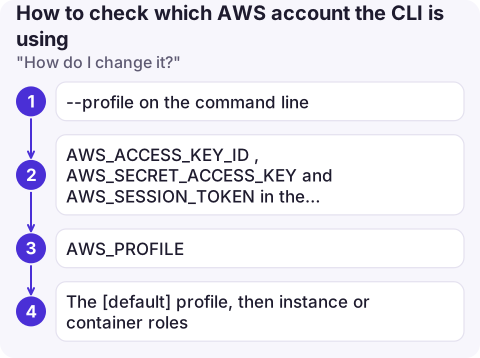
"How do I change it?"
You don't change what get-caller-identity says; you change which credentials the CLI picks up. In order of precedence:
--profileon the command line.AWS_ACCESS_KEY_ID,AWS_SECRET_ACCESS_KEYandAWS_SESSION_TOKENin the environment. Leftovers here are the most common reason for "wrong account":unsetthem.AWS_PROFILE.- The
[default]profile, then instance or container roles.
See switching profiles and assuming a role.
When get-caller-identity itself fails
| Error | Meaning |
|---|---|
| The security token included in the request is invalid | Credentials are malformed or revoked, or a session token is missing or belongs to other keys |
| ExpiredToken | Temporary credentials have expired; log in or assume the role again |
| InvalidClientTokenId | The access key ID doesn't exist (deleted, or from another partition) |
| Unable to locate credentials | No credentials found anywhere in the chain |
| SSO token expired | Run aws sso login |
Because the call needs no permissions, an AccessDenied on anything else combined with a successful get-caller-identity tells you the credentials are fine and the problem is policy.
Habits that prevent wrong-account mistakes
- Run
get-caller-identityat the start of any script that changes things, and abort ifAccountisn't the expected ID. - Show the active profile in your shell prompt.
- Give production profiles obviously different names and, ideally, read-only defaults.
- A successful call proves the credentials are valid now. Temporary credentials can still expire halfway through a long job, so long-running scripts should handle
ExpiredTokenand re-authenticate.
Questions
Does aws sts get-caller-identity need permissions?
No. Any valid credentials can call it, even if a policy denies everything else, so it is the safest test of which identity you are using.
How do I find my AWS account ID from the CLI?
aws sts get-caller-identity --query Account --output text prints just the 12-digit account ID.
Why does get-caller-identity show a different account from the console?
The CLI uses its own credentials chain (profile, environment variables, SSO cache) independent of the browser session. Check aws configure list to see what it is using.

Knowing which account you are in matters even more on a small screen. CloudConsole, a phone app for AWS, is built to keep the account and role visible on every screen, with production guardrails.
About the app → · Download on the App Store