 CloudConsole
IAM policy: Session Manager access to tagged instances
Allow ssm:StartSession on instance ARNs with an ssm:resourceTag condition and on the SSM-SessionManagerRunShell document, allow ssm:TerminateSession and ssm:ResumeSession only on sessions named after the caller, and give the instances AmazonSSMManagedInstanceCore. No SSH keys or inbound ports needed.
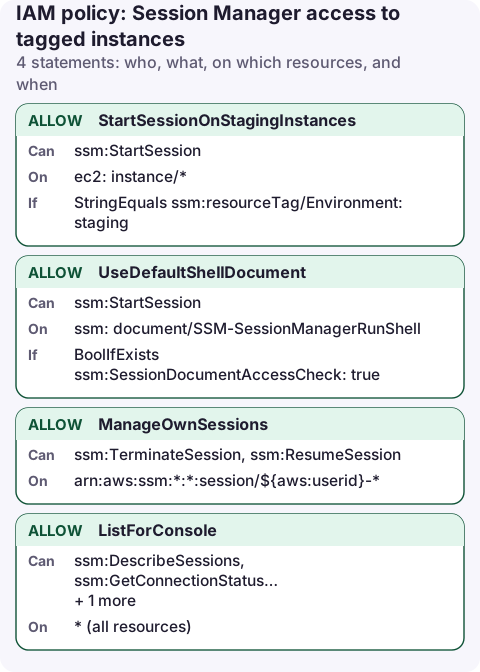
The user policy
{
  "Version": "2012-10-17",
  "Statement": [
    {
      "Sid": "StartSessionOnStagingInstances",
      "Effect": "Allow",
      "Action": "ssm:StartSession",
      "Resource": "arn:aws:ec2:eu-west-2:123456789012:instance/*",
      "Condition": {
        "StringEquals": {
          "ssm:resourceTag/Environment": "staging"
        }
      }
    },
    {
      "Sid": "UseDefaultShellDocument",
      "Effect": "Allow",
      "Action": "ssm:StartSession",
      "Resource": "arn:aws:ssm:eu-west-2:123456789012:document/SSM-SessionManagerRunShell",
      "Condition": {
        "BoolIfExists": {
          "ssm:SessionDocumentAccessCheck": "true"
        }
      }
    },
    {
      "Sid": "ManageOwnSessions",
      "Effect": "Allow",
      "Action": [
        "ssm:TerminateSession",
        "ssm:ResumeSession"
      ],
      "Resource": "arn:aws:ssm:*:*:session/${aws:userid}-*"
    },
    {
      "Sid": "ListForConsole",
      "Effect": "Allow",
      "Action": [
        "ssm:DescribeSessions",
        "ssm:GetConnectionStatus",
        "ssm:DescribeInstanceProperties",
        "ec2:DescribeInstances"
      ],
      "Resource": "*"
    }
  ]
}
What each statement does
- StartSessionOnStagingInstances: sessions only to instances tagged
Environment=staging. Session Manager documents the condition asssm:resourceTag/<key>. - UseDefaultShellDocument: a session also needs permission on the session document.
SSM-SessionManagerRunShellis the default shell document, holding your session preferences (logging, KMS). Thessm:SessionDocumentAccessCheckcondition makes Session Manager verify that the caller is allowed this document when the default is used. - ManageOwnSessions: session IDs start with the caller's identity, so
${aws:userid}-*lets people end and resume their own sessions but not someone else's. For IAM users, AWS examples use${aws:username}-*;${aws:userid}also works for roles and SSO users. - ListForConsole: what the console and the
aws ssm start-sessionworkflow need to find instances and show connection status.
The instance side
The instance needs a role with the managed policy AmazonSSMManagedInstanceCore and network access to the SSM endpoints (internet or VPC interface endpoints for ssm, ssmmessages and ec2messages).
aws iam attach-role-policy --role-name ec2-ssm \
  --policy-arn arn:aws:iam::aws:policy/AmazonSSMManagedInstanceCore

aws ssm start-session --target i-0123456789abcdef0
If the target shows as not connected, see TargetNotConnected.
Variations
- Port forwarding (for example to a database through a bastion): allow
ssm:StartSessiononarn:aws:ssm:eu-west-2::document/AWS-StartPortForwardingSessionToRemoteHost. AWS-owned documents have no account ID in their ARN. - SSH over Session Manager: the document is
AWS-StartSSHSession. This lets users bypass session logging, so many teams don't grant it. - Run as a specific OS user: tag the IAM role or user with
SSMSessionRunAsand turn on Run As support in session preferences.
Audit sessions
aws ssm describe-sessions --state History \
  --query 'Sessions[].[SessionId,Target,Owner,StartDate]' --output table
Turn on session logging to S3 or CloudWatch Logs in the session preferences to keep the commands people ran, not just who connected.
The session list in the console is not an audit log. The logging destination is where you keep a durable record of what was typed.
Common mistakes
- Using
ssm:*for Session Manager. It includesssm:SendCommand, which runs commands as root on any instance. - Tag condition on
aws:ResourceTagwithout testing. Stick to the key form in the Session Manager docs and confirm it with the simulator. - Forgetting the document statement: users get AccessDenied on StartSession even though the instance statement matches.
Questions
What IAM role does an EC2 instance need for Session Manager?
A role with the AWS managed policy AmazonSSMManagedInstanceCore, attached through an instance profile, plus outbound HTTPS to the SSM endpoints.
How do I limit Session Manager to certain instances?
Put a tag condition on the ssm:StartSession statement for instance ARNs, as above, and tag the instances people may reach.
Session Manager is the safe way into an instance during an incident, and it logs every session. Checking the instance's state and recent alarms from a phone first saves opening a shell you didn't need.
About the app → · Download on the App Store