 CloudConsole
IAM policy: require MFA for IAM users
Attach a Deny with NotAction listing the few calls needed to set up MFA, Resource *, and the condition BoolIfExists aws:MultiFactorAuthPresent false. Users without an MFA session can only enrol a device and change their password; everything else is denied until they sign in again with MFA.
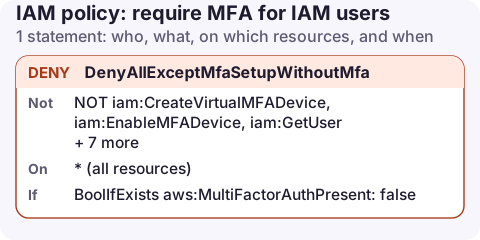
The policy
{
  "Version": "2012-10-17",
  "Statement": [
    {
      "Sid": "DenyAllExceptMfaSetupWithoutMfa",
      "Effect": "Deny",
      "NotAction": [
        "iam:CreateVirtualMFADevice",
        "iam:EnableMFADevice",
        "iam:GetUser",
        "iam:GetMFADevice",
        "iam:ListMFADevices",
        "iam:ListVirtualMFADevices",
        "iam:ResyncMFADevice",
        "iam:ChangePassword",
        "iam:GetAccountPasswordPolicy",
        "sts:GetSessionToken"
      ],
      "Resource": "*",
      "Condition": {
        "BoolIfExists": {
          "aws:MultiFactorAuthPresent": "false"
        }
      }
    }
  ]
}
This statement grants nothing. Pair it with the policies that give people their real permissions, and with self-service credentials so they can actually enrol a device.
How it works
- Deny + NotAction: deny every action except the listed ones. The exceptions are what a new user needs on their first sign-in: see their own user, create and enable a virtual MFA device, change a temporary password and read the password policy.
sts:GetSessionTokenstays allowed so CLI users can trade their access key and an MFA code for temporary credentials that do carry MFA.aws:MultiFactorAuthPresentistruein console sessions signed in with MFA and in temporary credentials obtained with an MFA code.
Bool or BoolIfExists?
This is the decision that catches people out. Requests signed with a long-term access key have no aws:MultiFactorAuthPresent key at all.
| Condition | Console without MFA | CLI with plain access key | CLI after GetSessionToken with MFA |
|---|---|---|---|
BoolIfExists false (above) | Denied | Denied | Allowed |
Bool false | Denied | Allowed | Allowed |
Use BoolIfExists when access keys must also be protected by MFA, and Bool when you only want to enforce MFA in the console.
aws sts get-session-token \
  --serial-number arn:aws:iam::123456789012:mfa/alex \
  --token-code 123456 --duration-seconds 43200
Where not to attach it
- Roles used by services or automation. Their sessions have no MFA, so
BoolIfExistsdenies everything. Attach this to IAM users or groups of people only. - IAM Identity Center. Enforce MFA in the Identity Center settings instead; that is where sign-in happens.
- Roles people assume. For those, put the MFA requirement in the role's trust policy (
"Bool": {"aws:MultiFactorAuthPresent": "true"}on thests:AssumeRolestatement) rather than in its permissions.
Check who has no MFA
aws iam generate-credential-report
aws iam get-credential-report --query Content --output text | base64 -d \
  | cut -d, -f1,4,8 | column -s, -t
Columns are user, password enabled and MFA active. Anyone with a console password and no MFA will be stuck at the enrolment step once this policy is attached, so warn them first.
Variations and mistakes
- Recent MFA only for sensitive actions: deny when
"NumericGreaterThan": {"aws:MultiFactorAuthAge": "3600"}, so the sign-in must be less than an hour old. - Protect only destructive actions: use
Actionwith a list such asec2:TerminateInstancesinstead ofNotAction. - Mistake:
"aws:MultiFactorAuthPresent": "true"with an Allow. Other allows without the condition still apply, so nothing is enforced. - Mistake: forgetting
iam:ChangePassword. New users with "must change password" set cannot get past the first screen.
Questions
How do I enforce MFA for AWS CLI access?
Use BoolIfExists as above. Users then run aws sts get-session-token with their MFA device ARN and code, and use the temporary credentials it returns.
Why is my IAM user denied everything after enabling an MFA policy?
They are signed in without MFA, or using an access key directly. Sign out and back in with MFA, or call GetSessionToken with an MFA code.
Can a security key (passkey) be used with GetSessionToken?
No. The API only accepts codes from virtual or hardware TOTP devices, so CLI users need one of those even if they use a security key in the console.
MFA rules matter more on a phone than anywhere else, because phones get lost. Use a 12-hour session from GetSessionToken or SSO rather than storing a bare access key; CloudConsole is being built to work with both.
About the app → · Download on the App Store