 CloudConsole
IAM policy: users manage their own credentials and MFA
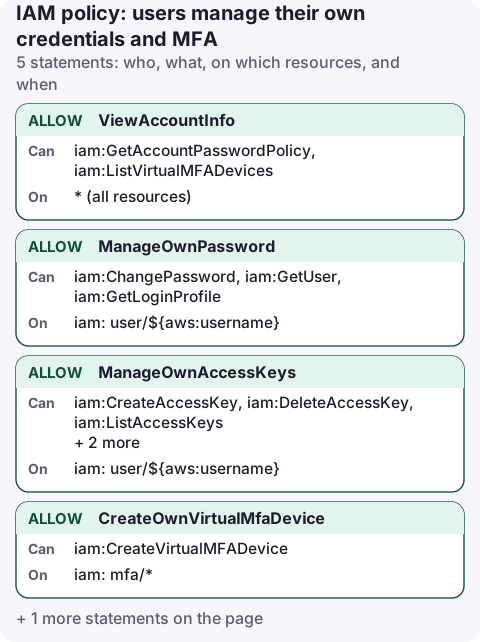
Use the ${aws:username} policy variable in the Resource so each user can call iam:ChangePassword, the access-key actions and the MFA actions only on their own user ARN. Attach the policy once to a group and it works for every member.
The policy
{
  "Version": "2012-10-17",
  "Statement": [
    {
      "Sid": "ViewAccountInfo",
      "Effect": "Allow",
      "Action": [
        "iam:GetAccountPasswordPolicy",
        "iam:ListVirtualMFADevices"
      ],
      "Resource": "*"
    },
    {
      "Sid": "ManageOwnPassword",
      "Effect": "Allow",
      "Action": [
        "iam:ChangePassword",
        "iam:GetUser",
        "iam:GetLoginProfile"
      ],
      "Resource": "arn:aws:iam::*:user/${aws:username}"
    },
    {
      "Sid": "ManageOwnAccessKeys",
      "Effect": "Allow",
      "Action": [
        "iam:CreateAccessKey",
        "iam:DeleteAccessKey",
        "iam:ListAccessKeys",
        "iam:UpdateAccessKey",
        "iam:GetAccessKeyLastUsed"
      ],
      "Resource": "arn:aws:iam::*:user/${aws:username}"
    },
    {
      "Sid": "CreateOwnVirtualMfaDevice",
      "Effect": "Allow",
      "Action": "iam:CreateVirtualMFADevice",
      "Resource": "arn:aws:iam::*:mfa/*"
    },
    {
      "Sid": "ManageOwnMfa",
      "Effect": "Allow",
      "Action": [
        "iam:EnableMFADevice",
        "iam:ListMFADevices",
        "iam:ResyncMFADevice",
        "iam:DeactivateMFADevice"
      ],
      "Resource": "arn:aws:iam::*:user/${aws:username}"
    }
  ]
}
What each statement allows
- ViewAccountInfo: read the account password policy (so the console can show the rules) and list virtual MFA devices. Neither supports a narrower resource.
- ManageOwnPassword: change your own console password.
${aws:username}is replaced at request time with the caller's user name, soalexcan only act onuser/alex. - ManageOwnAccessKeys: create, deactivate, delete and inspect your own keys, which is everything needed for key rotation.
- CreateOwnVirtualMfaDevice: virtual MFA devices are their own IAM resources. Device names are free text, so the resource is
mfa/*; the device is useless until it is enabled on a user. - ManageOwnMfa: enable, resync and remove MFA on your own user.
Attach it to a group
aws iam create-policy --policy-name self-service-credentials \
  --policy-document file://self-service.json

aws iam attach-group-policy --group-name all-iam-users \
  --policy-arn arn:aws:iam::123456789012:policy/self-service-credentials
Then sign in as a test user, open Security credentials from the account menu, and check you can assign an MFA device and create an access key.
Make MFA mandatory too
On its own, this policy lets a user without MFA delete their keys and create new ones. Most teams combine it with the require-MFA deny policy, which blocks everything except MFA setup until the user signs in with MFA. With both attached, a stolen password alone can't be used to create new access keys.
For an extra guard, add "Condition": {"Bool": {"aws:MultiFactorAuthPresent": "true"}} to ManageOwnAccessKeys and to the deactivate action, so keys can only be changed from an MFA session.
Common mistakes
- Expecting it to work for roles or SSO users.
${aws:username}only exists for IAM users. People who sign in through IAM Identity Center manage their MFA in the access portal instead. - Hard-coding the account ID is fine, but
arn:aws:iam::*:user/${aws:username}lets the same policy be reused in every account. - Using
iam:*onuser/${aws:username}. That includes attaching policies to yourself, which is privilege escalation. - Users with a path such as
user/engineering/alexdon't matchuser/${aws:username}. Useuser/*/${aws:username}or keep users at the root path.
Questions
How do I allow an IAM user to change their own password?
Allow iam:ChangePassword on arn:aws:iam::*:user/${aws:username}, or turn on "Allow users to change their own password" in the account password policy.
Can users rotate their own access keys without admin rights?
Yes, with the ManageOwnAccessKeys statement above. It only matches the caller's own user ARN.
A key that leaks on a weekend needs deactivating fast. Self-service permissions mean the owner can do that themselves, from wherever they are, without waiting for an admin.
About the app → · Download on the App Store