 CloudConsole
AWS CloudFormation limits and quotas
A CloudFormation template can declare at most 500 resources, 200 parameters, 200 outputs and 200 mappings. A template passed inline in CreateStack, UpdateStack or ValidateTemplate is limited to 51,200 bytes; uploaded to S3 and referenced by URL it can be 1 MB. An account can have 2,000 stacks per Region by default (adjustable), and a nested stack hierarchy can create, update or delete at most 2,500 resources in one operation.
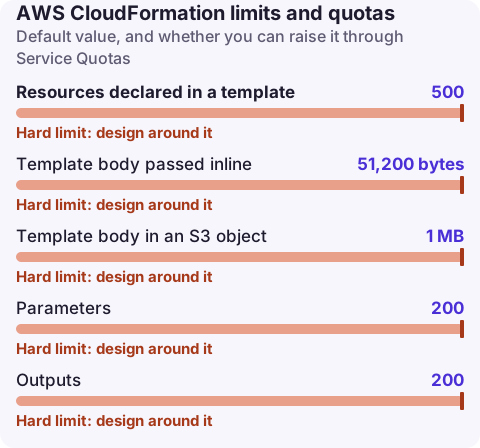
Template and stack quotas
| Quota | Value | Adjustable |
|---|---|---|
| Resources declared in a template | 500 | No |
| Template body passed inline | 51,200 bytes | No |
| Template body in an S3 object | 1 MB | No |
| Parameters | 200 | No |
| Outputs | 200 | No |
| Mappings / attributes per mapping | 200 / 200 | No |
| Parameter value size | 4,096 bytes | No |
| Names of resources, parameters, outputs, mappings | 255 characters | No |
| Stack name | 128 characters | No |
| Template description | 1,024 bytes | No |
| Dynamic references per template | 60 | No |
| cfn-signal / custom resource response data | 4,096 bytes | No |
| Stacks per account per Region | 2,000 | Yes |
| Resources per nested-stack operation | 2,500 | No |
| StackSets per administrator account | 1,000 | Yes |
| Stack instances per stack set | 100,000 | Yes |
| Hooks per account / per resource | 100 / 100 | No |
The errors you'll see
- Inline template too big:
ValidationError: 1 validation error detected: Value '...' at 'templateBody' failed to satisfy constraint: Member must have length less than or equal to 51200. Use--template-urlwith an S3 object, or letaws cloudformation deploy --s3-bucket/packageupload it. - Too many resources:
Template format error: Number of resources, 512, is greater than maximum allowed, 500. See template format errors. - Too many stacks:
LimitExceededExceptionon CreateStack; delete unused stacks or request more.
Transforms make the 500 count deceptive: SAM and CDK constructs expand into several resources each (a SAM function with an API event can become five or more), and the limit applies to the processed template. Check the expanded count:
aws cloudformation get-template --stack-name orders-api --template-stage Processed \
  --query 'length(keys(TemplateBody.Resources))'

# Stacks in this Region (excluding deleted)
aws cloudformation list-stacks --stack-status-filter CREATE_COMPLETE UPDATE_COMPLETE UPDATE_ROLLBACK_COMPLETE \
  --query 'length(StackSummaries)'

# The account's stack quota
aws cloudformation describe-account-limits
Getting under 500 resources
- Nested stacks: move groups of resources (networking, a service's alarms, IAM) into child stacks; each child has its own 500 limit, and the parent counts each child as one resource.
- Separate stacks with exports or SSM parameters: split by lifecycle (shared network, data stores, application). Exports can't be changed while imported, so prefer SSM parameters for values that evolve; see export in use.
- In CDK, split into several
Stackclasses or useNestedStack. - Remove per-item resources: one alarm per queue across 200 queues is 200 resources; a metric-math alarm or a separate monitoring stack may be better.
Getting under the size limits
- Always deploy from S3 (the CLI's
deployandpackagedo this when given a bucket) so you have 1 MB, not 51,200 bytes. - Minify JSON or strip comments and descriptions in generated templates.
- Large inline Lambda code (
ZipFile) or long policy documents inflate templates; move code to S3 assets and use managed policies.
Questions
How many resources can a CloudFormation stack have?
500 resources per template. Nested stacks let a hierarchy contain more, but one operation can create, update or delete at most 2,500 resources.
What is the maximum CloudFormation template size?
51,200 bytes when passed inline and 1 MB when stored in S3 and referenced with a template URL.
How many CloudFormation stacks can I have?
2,000 per account per Region by default. The quota is adjustable.
Template limits break deploys at the worst time, during an urgent change. CloudConsole, a phone app for AWS, is being built to show stack events and failures on your phone.
About the app → · Download on the App Store