 CloudConsole
Get unique values in CloudWatch Logs Insights
To list each distinct value of a field, use stats count(*) by field, which returns one row per value along with how often it appears. To get just the number of distinct values, use stats count_distinct(field). To keep one full log event per value, sort and then dedup field.
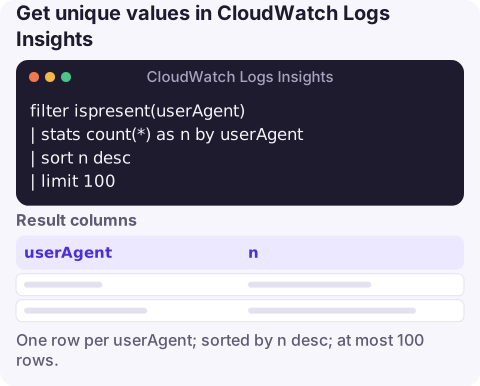
Three ways to get unique values
1. List distinct values with their counts (the most useful form):
filter ispresent(userAgent)
| stats count(*) as n by userAgent
| sort n desc
| limit 100
2. Count how many distinct values there are:
stats count_distinct(userId) as uniqueUsers3. Keep one complete event per value, for example the latest error per host:
fields @timestamp, host, @message
| filter level = "ERROR"
| sort @timestamp desc
| dedup host
How each one works
stats count(*) as n by userAgentbuilds a group for every distinctuserAgentand counts the events in it, so the output is the set of unique values. Thefilter ispresent(...)before it removes events missing the field, which would otherwise appear as one blank group.count_distinct(userId)returns a single number. For fields with very many distinct values it is calculated approximately, which is fine for "roughly how many users hit this?" but not for billing or audit counts.dedup hostkeeps the first event it sees for eachhostand drops the rest. Because "first" depends on order, put asortbefore it; withsort @timestamp descyou get the most recent event per host.
Variations
Unique combinations of two fields:
stats count(*) as n by sourceIPAddress, userIdentity.arn
| sort n desc
Unique values over time: distinct users per hour, charted on the Visualization tab:
stats count_distinct(userId) as users by bin(1h)Values from text logs, after extracting the field with parse:
parse @message "tenant=* " as tenant
| stats count(*) as events by tenant
| sort events desc
Just the values, no counts: stats always returns its aggregate column, so if you only want the field itself, select it with fields, sort, and dedup:
fields tenant
| filter ispresent(tenant)
| sort tenant asc
| dedup tenant
Limits to keep in mind
- The result set is capped at 10,000 rows. If a field has more distinct values than that, the list is incomplete; use
count_distinctfor the total, or narrow the time range. See working past 10,000 results. - You pay for data scanned, not rows returned, so listing unique values over 30 days of a busy log group can be expensive. Start with a short window.
- Values are case-sensitive and whitespace-sensitive. Normalise with
tolower()ortrim()in afieldsstep if you're getting near-duplicates.
Which to use when
| Question | Use |
|---|---|
| What values exist, and how common is each? | stats count(*) by field |
| How many distinct values? | stats count_distinct(field) |
| Show me one real event for each value | sort then dedup field |
| When was each value last seen? | stats latest(@timestamp) as lastSeen by field |
Questions
How do I get distinct values in CloudWatch Logs Insights?
Use stats count(*) by fieldName. Each row is one distinct value, with the count of events that had it.
How do I count unique values in Logs Insights?
Use stats count_distinct(fieldName). It's approximate for very high-cardinality fields.
What does dedup do in Logs Insights?
It keeps the first event for each unique value of the fields you name and drops the rest, based on the current sort order.
Questions like 'how many customers hit this error?' come up mid-incident. CloudConsole, a phone app for AWS, is built to bring alarms and log views to your phone for those moments.
About the app → · Download on the App Store