 CloudConsole
ap-east-2: Asia Pacific (Taipei)
ap-east-2 is the code for the Asia Pacific (Taipei) region in Taiwan. It is one of AWS's newer regions and is opt-in, so it must be enabled per account before use. It is aimed at Taiwanese organisations that want data hosted in Taiwan and lower latency to users there.
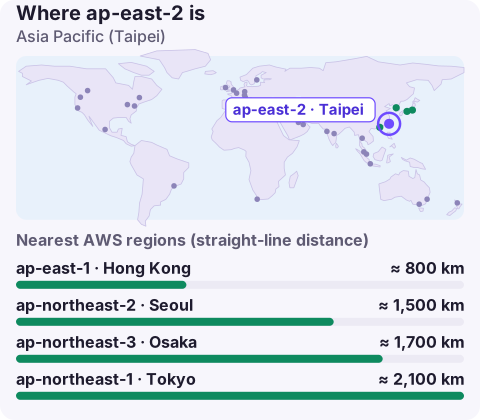
Why Taipei
Taiwanese companies previously ran their AWS workloads mostly in Tokyo, Hong Kong or Singapore. A region on the island helps with:
- Local data hosting: financial institutions, healthcare providers, semiconductor and manufacturing firms and public-sector bodies often prefer or are required to keep sensitive data in Taiwan.
- Latency: interactive consumer services, games and payment systems avoid the hop to Tokyo or Hong Kong.
- Hybrid connectivity: factories and data centres in Taiwan can link to a nearby region over Direct Connect with shorter paths.
Enabling ap-east-2
aws account get-region-opt-status --region-name ap-east-2
aws account enable-region --region-name ap-east-2

# member account, run from the Organizations management account
aws account enable-region --region-name ap-east-2 --account-id 123456789012
The status moves through ENABLING before ENABLED; deployments started too early fail. Because the region is recent, also check your tooling: CLI, SDK and Terraform provider releases from before the launch may not recognise ap-east-2 or know its endpoints. Update them before you start debugging anything else.
Targeting it
Set --region ap-east-2 on commands, AWS_REGION=ap-east-2 in the environment, or region = ap-east-2 in ~/.aws/config. Endpoints follow <service>.ap-east-2.amazonaws.com. Note the near neighbour ap-east-1 is Hong Kong; one digit separates two different jurisdictions.
Tokens issued by the global STS endpoint are, by default, not accepted in opt-in regions. If you see an invalid-token error here but not in Tokyo, switch to regional STS.
Services in a new region
Newer regions start with a core set of services and add more over time. Before you commit, list every managed service in your design and check each on the AWS Regional Services List. For compute, check instance families with aws ec2 describe-instance-type-offerings --region ap-east-2. Raise service quotas early; they begin at defaults, and approvals in a new region can take time.
Nearest alternatives
ap-east-1 (Hong Kong) and ap-northeast-1 (Tokyo) are the nearest established regions, with ap-northeast-3 (Osaka), ap-northeast-2 (Seoul) and ap-southeast-1 (Singapore) also within reach. Tokyo is the usual choice when you need the widest service set nearby for recovery or for non-resident workloads. If data must stay in Taiwan, build resilience across Availability Zones in Taipei and keep backups in a separate account.
A practical approach while the region's catalogue fills out is a split design: keep the components that hold Taiwanese personal or regulated data in ap-east-2, and run supporting systems that hold no such data, such as build pipelines, observability back ends or analytics on anonymised datasets, in Tokyo. Document the split clearly, because the next engineer to join will otherwise assume everything lives in one place.
Questions
Where is ap-east-2?
In Taiwan; AWS names it Asia Pacific (Taipei).
Is ap-east-2 opt-in?
Yes. Enable it per account before creating resources.
Why does my CLI reject ap-east-2?
Your CLI or SDK version may predate the region. Upgrade it so it knows the region and its endpoints.
A new region tends to surface its quirks just after go-live, often out of hours. CloudConsole, a phone app for AWS, is built to show alarms and resources from every region you use on your phone.
About the app → · Download on the App Store