 CloudConsole
CloudWatch alarm: ECS TaskEphemeralStorageUtilization per service
Alarm on ECS/ContainerInsights TaskEphemeralStorageUtilization with ClusterName and ServiceName, Average over 60 seconds, above 80 for 5 consecutive periods. Scoped to one service, it tells you exactly which workload is running out of task scratch space, which the cluster-wide variant can easily miss.
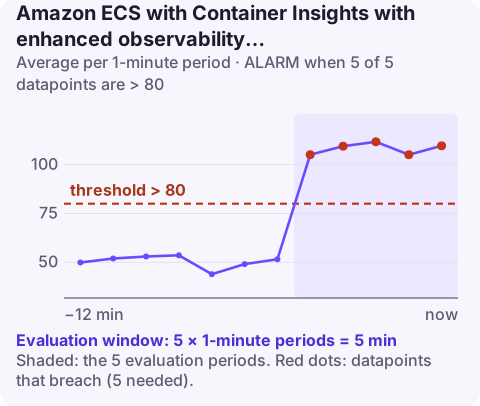
What changes with the ServiceName dimension
The metric is the same as the cluster-level alarm: the share of a task's ephemeral storage reservation in use. Adding ServiceName narrows the average to the tasks of a single service, so the number reflects that service's own disk behaviour rather than the whole cluster's.
Use this version for any service that writes to its local file system in a way that grows with traffic or time: thumbnail generators, services that download and unpack archives, anything that spools uploads to /tmp, and apps that write log files inside the container. Keep the cluster alarm as the safety net for everything else.
Recommended alarm settings
| Setting | Recommended value |
|---|---|
| Namespace | ECS/ContainerInsights |
| Metric | TaskEphemeralStorageUtilization |
| Dimensions | ClusterName, ServiceName |
| Statistic | Average |
| Threshold | 80.0 |
| Period | 60 seconds |
| Datapoints to alarm | 5 |
| Evaluation periods | 5 |
| Comparison operator | GreaterThanThreshold |
Setting a threshold that means something
The recommended 80% assumes usage grows gradually. Check how the service actually behaves before you accept it:
- Sawtooth pattern (fills during a job, empties after): set the threshold just above the normal peak, otherwise every job run pages someone.
- Monotonic climb until the task is replaced: that is a leak of files. 80% is fine, but schedule a fix, because the alarm will keep firing on every long-lived task.
- Flat but high because of a large image: raise the reservation in the task definition so the alarm measures headroom you actually have.
Five one-minute datapoints is short for storage. If the service writes big files in bursts, it may go from 80% to 100% inside that window, so consider a lower threshold rather than a shorter window.
Create the alarm
aws cloudwatch put-metric-alarm \
  --alarm-name ecs-prod-thumbnails-ephemeral-80 \
  --alarm-description "thumbnails tasks above 80% of ephemeral storage" \
  --namespace ECS/ContainerInsights \
  --metric-name TaskEphemeralStorageUtilization \
  --dimensions Name=ClusterName,Value=prod-cluster Name=ServiceName,Value=thumbnails \
  --statistic Average \
  --period 60 \
  --evaluation-periods 5 \
  --datapoints-to-alarm 5 \
  --threshold 80 \
  --comparison-operator GreaterThanThreshold \
  --treat-missing-data notBreaching \
  --alarm-actions arn:aws:sns:eu-west-2:123456789012:oncall-alerts
Repeat per service, or generate the alarms from your infrastructure code alongside the service definition so new services get one automatically.
What to do when it fires
- Confirm impact: check recent stopped tasks for the service (describe-tasks) and the application logs for "No space left on device".
- Look inside a running task with ECS Exec:
df -h /anddu -xh / | sort -h | tail. - Immediate relief: replace the fullest tasks; each new Fargate task starts with an empty writable layer. Forcing a new deployment does this for every task.
- Lasting fix: delete temporary files after use, stream instead of buffering to disk, move large working sets to EFS or an attached EBS volume, or raise
ephemeralStorage.sizeInGiB.
Questions
How do I set a CloudWatch alarm for ECS task failure caused by disk space?
Use this per-service alarm as the early warning, and a RunningTaskCount alarm for tasks that have already stopped. Disk exhaustion usually ends with the essential container exiting.
Should I use the cluster or service version of this alarm?
Both, if you can. The service version pinpoints the workload; the cluster version is one cheap alarm that catches changes shared by many services.
Does EFS or EBS storage count towards this metric?
No. Volumes mounted from EFS or attached EBS have their own metrics; this one measures the task's ephemeral storage reservation.
When one service's tasks start filling their disks, the first sign is often a page about restarts. CloudConsole is a phone app for AWS, built to let you read the alarm and the affected service's state from wherever you are.
Did it start after a deploy? What changed? on the app’s alarm screen lists the deploys and configuration changes from the hour before the alarm fired.
About the app → · Download on the App Store