 CloudConsole
How much do CloudWatch alarms cost?
CloudWatch metric alarms are billed per alarm metric per month, prorated hourly, for as long as the alarm exists. The pricing examples for US East (N. Virginia) use $0.10 per standard-resolution alarm metric per month; high-resolution alarms cost more. Anomaly detection alarms count three metrics, metric math alarms count each metric referenced, and dashboards beyond three free ones are billed per dashboard per month.
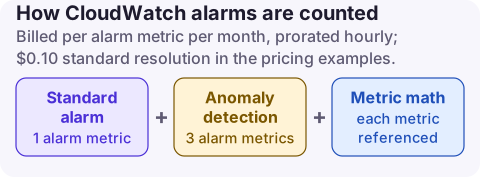
How alarms are counted
| Alarm type | Billed as | Usage type |
|---|---|---|
| Standard metric alarm (60-second evaluation) | One alarm metric per metric listed | AlarmMonitorUsage |
| High-resolution alarm (10-second evaluation) | One high-res alarm metric per metric, at a higher rate | HighResAlarmMonitorUsage |
| Metric math alarm | Each metric in the expression (up to 10) | AlarmMonitorUsage |
| Anomaly detection alarm | The metric plus two band metrics: three in total | AlarmMonitorUsage |
| Metrics Insights query alarm | Each metric the query analyses | MetricInsightAlarmUsage |
| Composite alarm | A flat hourly cost, however many alarms it watches | CompositeAlarmMonitorUsage |
The free tier includes 10 alarm metrics (standard resolution alarms that list metrics directly) and 3 custom dashboards of up to 50 metrics each. Alarms cost the same whether they are OK, ALARM or INSUFFICIENT_DATA, and whether their actions are enabled.
Why the alarm line grows
- Orphaned alarms: the instance, queue or function was deleted but its alarms were not. They sit in INSUFFICIENT_DATA forever.
- Auto-created alarms from Auto Scaling target tracking, which manages its own alarms, multiplied by many groups.
- Per-resource alarm templates applied to thousands of resources where one aggregated or Metrics Insights alarm would do.
- High resolution by default in templates that do not need 10-second evaluation.
- Alarms in Regions you no longer use.
Find and clean up
# Alarms with no data (often orphaned), in this Region
aws cloudwatch describe-alarms --state-value INSUFFICIENT_DATA \
  --query 'MetricAlarms[].[AlarmName,Namespace,MetricName,StateUpdatedTimestamp]' \
  --output table

# Count alarms per namespace
aws cloudwatch describe-alarms \
  --query 'MetricAlarms[].Namespace' --output text | tr '\t' '\n' | sort | uniq -c | sort -rn

# Destructive: delete alarms you have confirmed are orphaned
aws cloudwatch delete-alarms --alarm-names old-queue-depth old-cpu-high
Before deleting, check the alarm's dimensions point at a resource that no longer exists; an alarm can sit in INSUFFICIENT_DATA simply because the metric is sparse (for example an error count that only appears on failures). Do not delete alarms that Auto Scaling target tracking created; remove the scaling policy instead.
Cheaper alarm designs
- Use a Metrics Insights query alarm to watch a whole fleet with one alarm, and keep its filter tight so it analyses only the metrics you mean.
- Pre-aggregate in the application and alarm on one metric rather than a math expression over many.
- Keep high resolution for the few alarms where 10-second detection changes the outcome.
- Composite alarms cut noise but add cost; use them for paging logic, not for every pair of alarms.
- The recommended alarms pages list the alarms worth keeping per service.
Questions
Does a CloudWatch alarm cost money?
Yes, beyond the free tier of 10 standard alarm metrics. Each alarm is billed per alarm metric per month, prorated hourly, while it exists.
Do alarms in INSUFFICIENT_DATA state cost money?
Yes. Alarms are billed for existing, not for their state, so orphaned alarms keep costing until deleted.
Do CloudWatch dashboards cost money?
Three custom dashboards with up to 50 metrics each are free per month; others are billed per dashboard per month. Automatic dashboards are free.
Orphaned alarms are cheap individually and invisible collectively. CloudConsole, a phone app for AWS, is built to show alarms and costs side by side on your phone, with AlarmMonitorUsage explained, which makes clean-up candidates easier to spot.
About the app → · Download on the App Store