 CloudConsole
DynamoDB on-demand vs provisioned: which is cheaper?
On-demand bills per read and write request unit you actually use, so idle time costs nothing; provisioned bills per read and write capacity unit-hour you configure, whether or not you use it, at a lower price per unit. Provisioned is cheaper for steady, predictable traffic that keeps capacity well utilised; on-demand is cheaper for spiky, low or unknown traffic. You can switch from provisioned to on-demand up to four times in a rolling 24 hours, and back at any time.
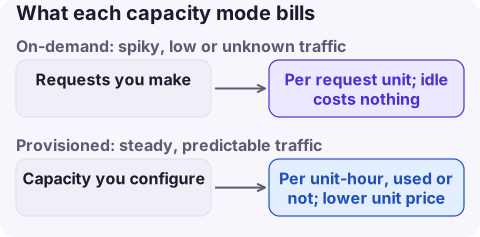
How each mode appears on the bill
| Mode | Usage types | You pay for |
|---|---|---|
| On-demand | ReadRequestUnits, WriteRequestUnits | Requests made |
| Provisioned | ReadCapacityUnit-Hrs, WriteCapacityUnit-Hrs | Capacity configured, every hour |
| Both | TimedStorage-ByteHrs | Table and index storage |
Usage types have an optional Region prefix (for example USW2-ReadRequestUnits); no prefix means us-east-1. Global secondary indexes consume and bill their own capacity in both modes.
Reserved capacity, bought for one or three years, applies only to provisioned capacity. A table you might move to on-demand later is a poor candidate for a reservation, and on-demand tables cannot use it.
Compare on your own numbers
- Pull
ConsumedReadCapacityUnitsandConsumedWriteCapacityUnitsfor the table (and each GSI) over two to four weeks. - On-demand estimate: total consumed units x on-demand request price.
- Provisioned estimate: the capacity you would need to provision (peak plus headroom, or what auto scaling would track) x hours x capacity-hour price.
- Compare with your Region's prices from the DynamoDB pricing page.
# Consumed write capacity, hourly sums for the last 14 days
aws cloudwatch get-metric-statistics --namespace AWS/DynamoDB \
  --metric-name ConsumedWriteCapacityUnits \
  --dimensions Name=TableName,Value=my-table \
  --start-time 2026-11-03T00:00:00Z --end-time 2026-11-17T00:00:00Z \
  --period 3600 --statistics Sum --output text

# Current mode and provisioned throughput
aws dynamodb describe-table --table-name my-table \
  --query 'Table.[BillingModeSummary.BillingMode,ProvisionedThroughput]'
A flat consumption line with a modest peak-to-average ratio favours provisioned; long idle periods with sharp bursts favour on-demand.
Switch and tune
# To on-demand (allowed up to four times in a rolling 24 hours)
aws dynamodb update-table --table-name my-table --billing-mode PAY_PER_REQUEST

# To provisioned, with explicit capacity (then attach auto scaling)
aws dynamodb update-table --table-name my-table --billing-mode PROVISIONED \
--provisioned-throughput ReadCapacityUnits=200,WriteCapacityUnits=50- With provisioned, use auto scaling with a target utilisation, and buy reserved capacity only for the steady floor.
- With on-demand, set a maximum throughput per table to bound cost from runaway clients.
- The Standard-Infrequent Access table class lowers storage cost for tables where storage dominates throughput.
What not to do
- Do not switch to provisioned with capacity set to today's average; bursts above it are throttled.
- Do not forget GSIs when estimating; a busy index can cost as much as the table.
- Do not use scans for routine reads; they consume capacity for every item read, in either mode.
- Do not delete expired items with your own batch job when Time to Live can do it: TTL deletions do not consume write capacity, while a cleanup job pays for every delete.
Questions
Is DynamoDB on-demand more expensive than provisioned?
Per unit, yes. In total it is often cheaper for spiky or low traffic because you pay nothing for idle capacity.
How often can I switch DynamoDB capacity modes?
From provisioned to on-demand up to four times in a rolling 24-hour window; from on-demand to provisioned at any time.
What is ReadCapacityUnit-Hrs on my bill?
Provisioned read capacity, billed per unit per hour whether or not it was used.
Capacity mode decisions age as traffic changes. CloudConsole, a phone app for AWS, shows DynamoDB spend by usage type, with request-unit and capacity-hour lines explained, so you can tell which mode a table is paying for from your phone.
About the app → · Download on the App Store