 CloudConsole
What drives AWS Lambda cost, and how to cut it
Lambda bills per request and per GB-second of duration: memory allocated multiplied by execution time, rounded up to the millisecond. The pricing examples for US East (N. Virginia) use $0.20 per million requests and $0.0000166667 per GB-second for x86, with Arm cheaper per GB-second. A high Lambda line usually means over-allocated memory, long waits on downstream calls, or far more invocations than expected.
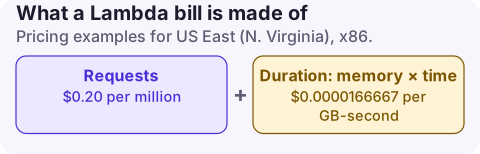
How the charge is calculated
- Requests: every invocation, including retries and invocations that error. Asynchronous events larger than 256 KB count as extra requests per 64 KB chunk.
- Duration: GB-seconds = memory in GB x billed seconds. Initialisation code outside the handler is included in billed duration.
- Free tier: 1 million requests and 400,000 GB-seconds per month.
- Extras: provisioned concurrency (billed for the time it is configured), ephemeral storage above the free 512 MB, and Arm vs x86 pricing differences.
Duration appears as a usage type ending in Lambda-GB-Second, with an Arm variant, and requests as a separate request line. Memory also sets CPU: at 1,769 MB a function has the equivalent of one vCPU, so cutting memory can make a CPU-bound function slower and no cheaper.
The costs around Lambda
The Lambda line is often not the biggest part of a serverless bill:
Find the expensive functions
# Memory and architecture of every function in the Region
aws lambda list-functions \
  --query 'Functions[].[FunctionName,MemorySize,Architectures[0],Timeout]' --output table

# Invocations and average duration for one function over 7 days
aws cloudwatch get-metric-statistics --namespace AWS/Lambda \
  --metric-name Duration --dimensions Name=FunctionName,Value=my-function \
  --start-time 2026-11-10T00:00:00Z --end-time 2026-11-17T00:00:00Z \
  --period 604800 --statistics Average SampleCount
Approximate cost per function: invocations x average duration (s) x memory (GB) x GB-second price. Compare memory set with memory used using the max memory used query.
Reduce it, safest first
- Right-size memory with measurements; the open-source AWS Lambda Power Tuning tool runs the function at several sizes and shows the cheapest.
- Switch to arm64 where dependencies support it; the per-GB-second price is lower.
- Stop paying to wait: long synchronous calls to slow APIs bill the whole wait. Move waits to Step Functions or asynchronous patterns.
- Batch event sources: larger SQS and Kinesis batch sizes mean fewer invocations for the same work.
- Check for loops and retries: a function writing to the bucket that triggers it, or failing events retried repeatedly.
- Commit: Compute Savings Plans also apply to Lambda duration.
aws lambda update-function-configuration --function-name my-function --memory-size 512What not to do: set every function to 128 MB. Under-provisioned functions run longer, may time out, and can cost more.
Questions
What is a Lambda GB-second?
One second of execution with 1 GB of memory allocated. A 512 MB function running for 2 seconds uses 1 GB-second.
Is Lambda on Arm cheaper?
Yes. Arm (Graviton) duration is priced lower per GB-second than x86 on the Lambda pricing page.
Am I charged for Lambda init duration?
The pricing page states that duration includes initialisation code declared outside the handler.
Lambda costs move with traffic, retries and deploys. CloudConsole, a phone app for AWS, shows spend by service and usage type and explains the GB-second line, so you can see whether a jump is invocations or duration from your phone.
About the app → · Download on the App Store