 CloudConsole
ALB 503 Service Temporarily Unavailable
An ALB returns 503 when the listener rule that matched has no target to send the request to: the target group is empty, its targets are all draining or in Availability Zones the load balancer is not enabled in, or a fixed-response rule returns 503. Check the target group's registered targets first; with ECS, it usually means tasks are failing to start.
What it means
HTTP/1.1 503 Service Temporarily Unavailable
Server: awselb/2.0
Content-Type: text/html

<html><head><title>503 Service Temporarily Unavailable</title>...
The ALB found a rule for the request but had nowhere to forward it. It is counted in HTTPCode_ELB_503_Count. Note what is not a usual cause: if every registered target is merely failing health checks, the ALB fails open and keeps routing to them, so you tend to see slow responses or 502/504 instead. A 503 points at the target group having no usable targets at all.
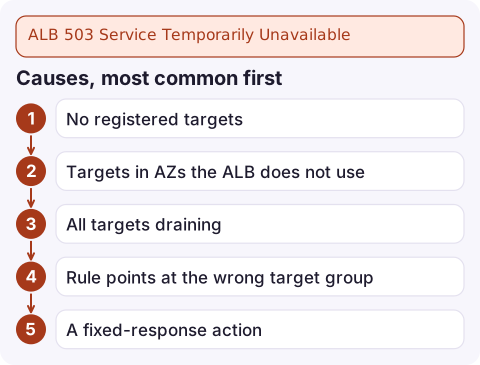
Causes, most common first
- No registered targets. An ECS service scaled to zero or crash-looping, an Auto Scaling group with desired capacity 0, or instances never registered.
- Targets in AZs the ALB does not use. They show as
unusedwith reasonTarget.NotInUse. - All targets draining during a deployment that removed old targets before new ones passed health checks.
- Rule points at the wrong target group, such as a new, empty one created by infrastructure code.
- A fixed-response action returning 503, often a maintenance rule someone forgot to remove.
Diagnose
Look at what is registered and in what state:
aws elbv2 describe-target-health --target-group-arn arn:aws:elasticloadbalancing:eu-west-2:123456789012:targetgroup/web/73e2d6bc24d8a067 \
  --query 'TargetHealthDescriptions[].{id:Target.Id,az:Target.AvailabilityZone,state:TargetHealth.State,reason:TargetHealth.Reason}' \
  --output table
An empty table means nothing is registered. Next, check which target group each rule actually forwards to, and whether any rule returns a fixed response:
aws elbv2 describe-rules \
  --listener-arn arn:aws:elasticloadbalancing:eu-west-2:123456789012:listener/app/my-alb/50dc6c495c0c9188/9f1c2e3d4b5a6978 \
  --query 'Rules[].{priority:Priority,conditions:Conditions[].Values,actions:Actions[].[Type,TargetGroupArn,FixedResponseConfig.StatusCode]}'
For ECS services, the service events say why tasks are not staying registered:
aws ecs describe-services --cluster my-cluster --services web \
  --query 'services[].{running:runningCount,desired:desiredCount,events:events[:5].message}'
Fix it
- ECS tasks crash-looping: fix the task (see essential container exited and failed ELB health checks), or roll back to the previous task definition.
- Scaled to zero: restore capacity with
aws ecs update-service --desired-countor the Auto Scaling group's desired capacity. - AZ mismatch: enable the missing subnets on the load balancer, or place targets in AZs it already uses.
- Wrong target group: point the rule at the group that holds the targets.
- Deployments: use rolling deployments with a minimum healthy percent above zero, so old targets stay until new ones are healthy.
Prevent it
Alarm on the target group's HealthyHostCount falling below your minimum, and on HTTPCode_ELB_503_Count. Consider a custom fixed-response or a static fallback for planned maintenance rather than letting an empty target group serve the default page.
Questions
Why does my ALB return 503 when my targets are running?
They are probably not registered in the target group the matching rule forwards to, or they are in an Availability Zone the load balancer is not enabled in. describe-target-health shows both.
Does an ALB return 503 when all targets are unhealthy?
Usually not. When every target is unhealthy the ALB fails open and routes to all of them. 503 normally means there are no registered, in-use targets.
What does a CloudFront 503 with a Lambda execution error mean?
That error comes from a Lambda@Edge or CloudFront Functions failure at the edge, not from your ALB. Check the function's logs in the Region closest to the viewer.

A 503 from an ALB usually means a service is completely down, so it is worth knowing about immediately. CloudConsole, a phone app for AWS, is built to show load balancer and ECS service alarms side by side on your phone.
Did it start after a deploy? What changed? on the app’s alarm screen lists the deploys and configuration changes from the hour before the alarm fired.
About the app → · Download on the App Store