 CloudConsole
502 Bad Gateway: Malformed Lambda proxy response
With Lambda proxy integration, API Gateway expects your function to return a JSON object with an integer statusCode, optional headers and a body that is a string. If the function returns anything else (an object as body, nothing at all, a bare string) the REST API returns 502 and logs "Malformed Lambda proxy response". Stringify the body and always return the full structure.
What you see
The client only gets a generic error:
HTTP/1.1 502 Bad Gateway

{"message": "Internal server error"}
The real reason is in the stage's execution log, which shows what Lambda returned before API Gateway rejected it:
Endpoint response body before transformations: {"statusCode":200,"body":{"id":42}}
Execution failed due to configuration error: Malformed Lambda proxy response
Method completed with status: 502
Here the function returned body as an object. The Lambda invocation itself succeeded, so Lambda's Errors metric stays flat while API Gateway's 5XXError climbs.
The shape API Gateway expects
{
  "statusCode": 200,
  "headers": { "Content-Type": "application/json" },
  "multiValueHeaders": { "Set-Cookie": ["a=1", "b=2"] },
  "body": "{\"id\":42}",
  "isBase64Encoded": false
}| Mistake | Fix |
|---|---|
body is an object or array | JSON.stringify(obj) / json.dumps(obj) |
Handler returns nothing (async function without return, or callback never called) | Return the response on every code path, including error branches |
Returning just the payload, without statusCode | Wrap it in the structure above |
| Header values that are not strings | Convert numbers to strings, or use multiValueHeaders for lists |
| Binary data returned raw | Base64-encode it, set isBase64Encoded: true, and configure binary media types on the API |
Diagnose
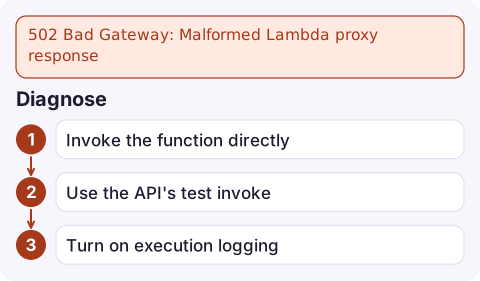
- Invoke the function directly with a sample event and inspect the raw return value:
aws lambda invoke --function-name orders-api \ --cli-binary-format raw-in-base64-out \ --payload file://apigw-event.json out.json && cat out.json - Use the API's test invoke, which returns the execution log without needing logging enabled on the stage:
aws apigateway test-invoke-method --rest-api-id abc123 \ --resource-id a1b2c3 --http-method GET \ --path-with-query-string '/orders/42' --query log --output text - Turn on execution logging for the stage if it is off (the account needs a CloudWatch Logs role set in API Gateway settings first):
aws apigateway update-stage --rest-api-id abc123 --stage-name prod \
  --patch-operations op=replace,path=/*/*/logging/loglevel,value=INFO
Fix patterns
Node.js:
export const handler = async (event) => {
  const order = await getOrder(event.pathParameters.id);
  return {
    statusCode: order ? 200 : 404,
    headers: { 'Content-Type': 'application/json' },
    body: JSON.stringify(order ?? { message: 'not found' }),
  };
};
Python:
def handler(event, context):
    order = get_order(event['pathParameters']['id'])
    return {
        'statusCode': 200 if order else 404,
        'headers': {'Content-Type': 'application/json'},
        'body': json.dumps(order or {'message': 'not found'}, default=str),
    }
Catch exceptions at the top of the handler and return a proper 500 response, so a bug produces a meaningful error instead of a malformed or failed proxy response.
Related failures
- If the function throws or times out, API Gateway also returns 502 or 504, but the log says the Lambda function failed rather than "malformed"; check Lambda's own logs.
- HTTP APIs with payload format 2.0 are more forgiving: a valid JSON return without
statusCodeis treated as a 200 with that JSON as the body. - An Application Load Balancer in front of Lambda has a similar contract and fails with its own 502; see ALB 502 Bad Gateway.
Questions
Why does API Gateway return 502 when my Lambda function succeeds?
Because the function's return value is not a valid proxy response. Lambda reports success, but API Gateway cannot turn the result into an HTTP response.
Does the body have to be a string in a Lambda proxy response?
Yes, for REST APIs. Serialise JSON with JSON.stringify or json.dumps; returning an object causes the malformed response error.
How do I see the execution log for an API Gateway 502?
Enable execution logging at INFO level on the stage, or run test-invoke-method, which returns the log for a single request.

A malformed response bug can take an endpoint down entirely while Lambda's dashboards look healthy. CloudConsole, a phone app for AWS, is built to show the API's 5xx alarm and the execution log lines next to each other on your phone.
Did it start after a deploy? What changed? on the app’s alarm screen lists the deploys and configuration changes from the hour before the alarm fired.
About the app → · Download on the App Store