 CloudConsole
Runtime.ExitError: RequestId ... Error: Runtime exited with error
The process running your function exited or was killed before it returned a response. The exit status in the message is the clue: "signal: killed" is almost always running out of memory, "exit status 1" or 2 is your code or runtime calling exit or crashing during start-up, and "signal: segmentation fault" points at a native library. Read the log lines just above the error to see what the process was doing.
What it looks like
START RequestId: 8f2a… Version: $LATEST
…
RequestId: 8f2a… Error: Runtime exited with error: exit status 1
Runtime.ExitError
END RequestId: 8f2a…
REPORT RequestId: 8f2a… Duration: 412.30 ms  Billed Duration: 413 ms  Memory Size: 512 MB  Max Memory Used: 88 MB
Lambda expects the runtime process to stay alive between invocations and hand back each result. If it exits, the current invocation fails with this error and the next one pays for a fresh start (a cold start).
Read the exit status
| Message ends with | Likely cause |
|---|---|
signal: killed | Out of memory. Max Memory Used equals Memory Size in the REPORT line; see Lambda out of memory |
exit status 1 | Code called process.exit(1) or sys.exit(1), or an uncaught error in a custom runtime or start-up script |
exit status 2 | Common for a Go panic on provided.al2023; the panic trace is in the log above |
signal: segmentation fault / signal: aborted | A native module or binary crashed, often one compiled for a different OS or CPU architecture |
exit status 0 | Something exited cleanly, e.g. a custom bootstrap that runs once instead of looping |
Common causes in practice
- Explicit exits in handler code. CLI-style scripts ported to Lambda often end with
process.exit()orsys.exit(). Return or throw instead; let the runtime report the result. - A crash during initialisation. Code at module level (reading config, opening a DB connection) throws and the runtime process dies. Wrap start-up work and log the error before it propagates.
- Native dependencies built on a laptop. Modules such as
sharp,bcryptor Python wheels with C extensions built on macOS or for x86_64, deployed to an arm64 function (or the reverse). - Custom runtimes whose
bootstrapdoesn't loop over the Runtime API'snextinvocation endpoint. - Memory exhaustion that kills the process abruptly.
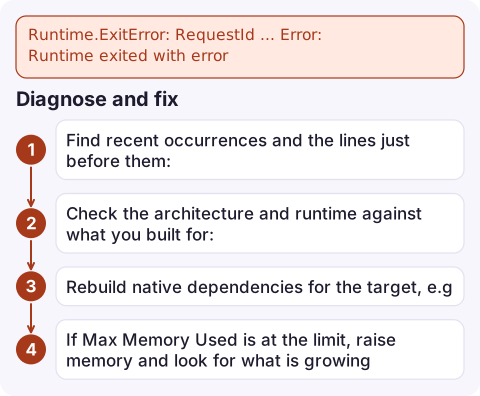
Diagnose and fix
- Find recent occurrences and the lines just before them:
aws logs filter-log-events --log-group-name /aws/lambda/my-function \ --filter-pattern '"Runtime exited with error"' --start-time $(date -d '-1 hour' +%s000) \ --query 'events[].message' --output text - Check the architecture and runtime against what you built for:
aws lambda get-function-configuration --function-name my-function \ --query '[Runtime,Architectures,MemorySize,Handler]' - Rebuild native dependencies for the target, e.g. Python wheels for arm64:
pip install -r requirements.txt -t package/ \ --platform manylinux2014_aarch64 --only-binary=:all: --python-version 3.12 - If
Max Memory Usedis at the limit, raise memory and look for what is growing.
Confirm the fix by invoking with a realistic payload and checking the REPORT line shows a clean finish. Alarm on the function's Errors metric (see Lambda Errors alarm) so a regression is caught early.
Questions
What is Runtime.ExitError in Lambda?
The runtime process exited or was killed while handling an invocation, so Lambda had no response to return. The exit status or signal in the message tells you why.
Does Runtime exited with error signal: killed mean out of memory?
Almost always. Check the REPORT line: if Max Memory Used equals Memory Size, increase memory or reduce what the function loads.
Is a Runtime.ExitError retried?
For asynchronous invocations, yes: Lambda retries failed async events by default, up to two more times. Synchronous callers get the error and decide themselves.

Exit errors tend to appear right after a deploy, as a sudden jump in the function's error rate. CloudConsole, a phone app for AWS, is built to show that alarm next to the crashing log lines on your phone, so you can decide quickly whether to roll back.
Did it start after a deploy? What changed? on the app’s alarm screen lists the deploys and configuration changes from the hour before the alarm fired.
About the app → · Download on the App Store