 CloudConsole
CloudWatch Logs retention settings
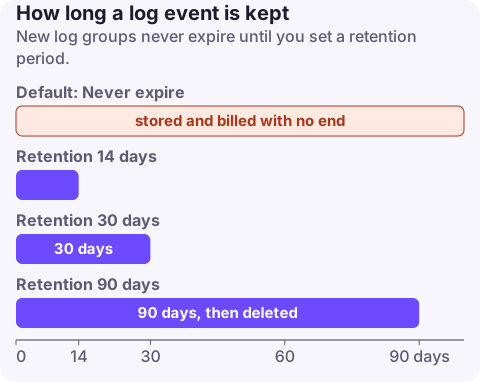
A new CloudWatch log group keeps its events forever ("Never expire") until you set a retention period. Allowed values are 1, 3, 5, 7, 14, 30, 60, 90, 120, 150, 180, 365, 400, 545, 731, 1096, 1827, 2192, 2557, 2922, 3288 and 3653 days. Most application logs need 14 to 90 days in CloudWatch, with anything longer exported to S3. You can now also set account-level retention policies (minimum 30 days) that apply to all log groups or to name prefixes, and override per-group settings.
How retention works
- Default: Never expire. Log groups created automatically (by Lambda, ECS, API Gateway, VPC Flow Logs and others) start that way too.
- Deletion is lazy: events past retention are marked for deletion and stop counting towards stored bytes and archive charges, but usually disappear within 72 hours, occasionally later.
- Ingestion check: PutLogEvents rejects events older than the group's retention period.
- Lowering retention deletes older events (after that delay). Raising it doesn't bring back events already marked for deletion.
For a step-by-step change in the console or one-off CLI, see set CloudWatch log retention. This page is about choosing values and enforcing them.
Recommended values
| Log type | Retention in CloudWatch | Longer-term copy |
|---|---|---|
| Lambda and container application logs (prod) | 30 days | Export or subscription to S3 if needed |
| Same, non-prod | 7 to 14 days | No |
| API Gateway access and execution logs | 30 days | Optional |
| VPC Flow Logs in CloudWatch | 14 to 30 days | Prefer delivering Flow Logs straight to S3 |
| Audit, security and compliance logs | 365 days or as policy requires | S3 with Object Lock / Glacier |
| CloudTrail delivered to CloudWatch | 90 days | CloudTrail's own S3 trail holds the long-term copy |
| Debug or very high-volume logs | 1 to 3 days | No |
Retention mostly matters for cost: storage is billed per GB-month for everything retained, and ingestion is billed regardless. Long retention of verbose logs is a common line on high AWS bills.
Set it on one group, on many, or account-wide
# One group
aws logs put-retention-policy --log-group-name /aws/lambda/orders-api --retention-in-days 30

# Find groups with no retention (never expire)
aws logs describe-log-groups --query 'logGroups[?retentionInDays==null].logGroupName' --output text

# Account-level policy: 30 days for every Lambda log group, applied to existing ones too (preview first)
aws logs put-account-policy --policy-name lambda-30d --policy-type RETENTION_POLICY \
  --policy-document '{"retentionInDays": 30, "enforcementMode": "RETROACTIVE"}' \
  --selection-criteria 'LogGroupNamePrefix="/aws/lambda"' --dry-run
Account-level retention policies (up to 20 per Region) use only LogGroupNamePrefix selection, require at least 30 days, accept NEVER_EXPIRE, and take effect 24 hours after you create or change them. RETROACTIVE applies to existing log groups; NEW_ONLY only to groups created later. When several policies match, the longest retention wins. Important: an account policy overrides a group's own setting, even a longer one, so run with --dry-run first to see which groups would lose data.
CloudFormation: RetentionInDays on AWS::Logs::LogGroup. Terraform: retention_in_days on aws_cloudwatch_log_group (0 means never expire). Create the log group in IaC before the service does, otherwise Lambda or ECS creates it with no retention.
Mistakes to avoid
- Relying on IaC for a log group that a service already created: the deploy fails with "already exists"; import the group or delete it first.
- Setting retention to a value not in the list, which the API rejects.
- Removing retention with
delete-retention-policywhen you meant to change it: that sets the group back to never expire. - Forgetting that an account policy silently replaces per-group values set by teams.
Questions
What is the default retention for CloudWatch Logs?
Never expire. Log groups keep their events indefinitely until you set a retention period.
What retention values can CloudWatch Logs use?
1, 3, 5, 7, 14, 30, 60, 90, 120, 150, 180, 365, 400, 545, 731, 1096, 1827, 2192, 2557, 2922, 3288 or 3653 days, or never expire.
How do I set CloudWatch log retention in Terraform?
Use retention_in_days on the aws_cloudwatch_log_group resource, and create the group in Terraform before the service writes to it.
Unlimited retention rarely causes an incident, but it quietly grows the bill every month. CloudConsole, a phone app for AWS, is being built to show cost and log data on your phone, so a surprise is easier to trace.
About the app → · Download on the App Store